
How to make a comic dub with AI voices (no voice actors)
A comic dub turns static pages into a voiced episode. Here is the step-by-step workflow to extract dialogue, cast AI voices that stay consistent, and sync the panels.
A comic dub is a voiced episode built from static comic pages, with AI voices reading the speech bubbles. Every comic dub follows five steps. Step 1 extracts the bubbles in panel reading order with OCR (optical character recognition). Step 2 turns the raw lines into a speaker script. Step 3 casts AI voices that listeners can tell apart. Step 4 generates the audio, and Step 5 lines the panels up with the audio in CapCut. For example, at a speaking rate of 150 words per minute, a chapter of 45 pages with 900 words of dialogue runs about six minutes. Free tools from Microsoft, Google and CapCut cover a first test for $0. First, pick a format. Finally, the last sections cover free tools versus a desktop app and the YouTube rules.
Which comic dub format fits a solo channel?
The format of a comic dub is the split between narrator lines and character lines in an episode. Solo creators pick one of three formats, based on how many voices one person can manage each week. A full dub sounds closest to an audio drama, because every character speaks every bubble. The trade-off is time: each line becomes a separate clip on the CapCut timeline.
- First, a full comic dub uses four to six character voices for every bubble, which suits short strips of 2 pages or single scenes.
- Second, a narrated recap uses one narrator for the whole chapter, which keeps audio and editing fast across a long series.
- Finally, a hybrid dub uses one narrator for scene changes and two lead voices for the key quotes.
In practice, the hybrid format is the easiest one to keep up every week with YouTube from Google as the main channel.
Step 1: Why does reading direction break comic dub dialogue?
Reading direction is the order in which a reader moves through the panels and bubbles on a page. Speech bubbles are part of the artwork, so OCR has to follow the same order from panel to panel. Office OCR reads straight across a two-column page and scrambles the conversation. Three extraction errors ruin dub timing when the text is not checked next to the art:
- Direction mismatch: reading right-to-left Japanese manga in left-to-right mode makes Character B answer `"Never!"` before Character A asks.
- Sound effect bleed: hand-lettered effects such as `"KRAAK"` or `"THUD"` merge into spoken lines, and the voice spells out the letters.
- Split bubbles: two connected bubbles from one speaker get separated by a reaction box.
In practice, a chapter of 12 pages with 3 bubbles per page gives 36 lines to check by eye, using Tofu Image Text or any review screen. Finally, fix the order before writing the script. Cleanup steps are in extract text from manga pages.
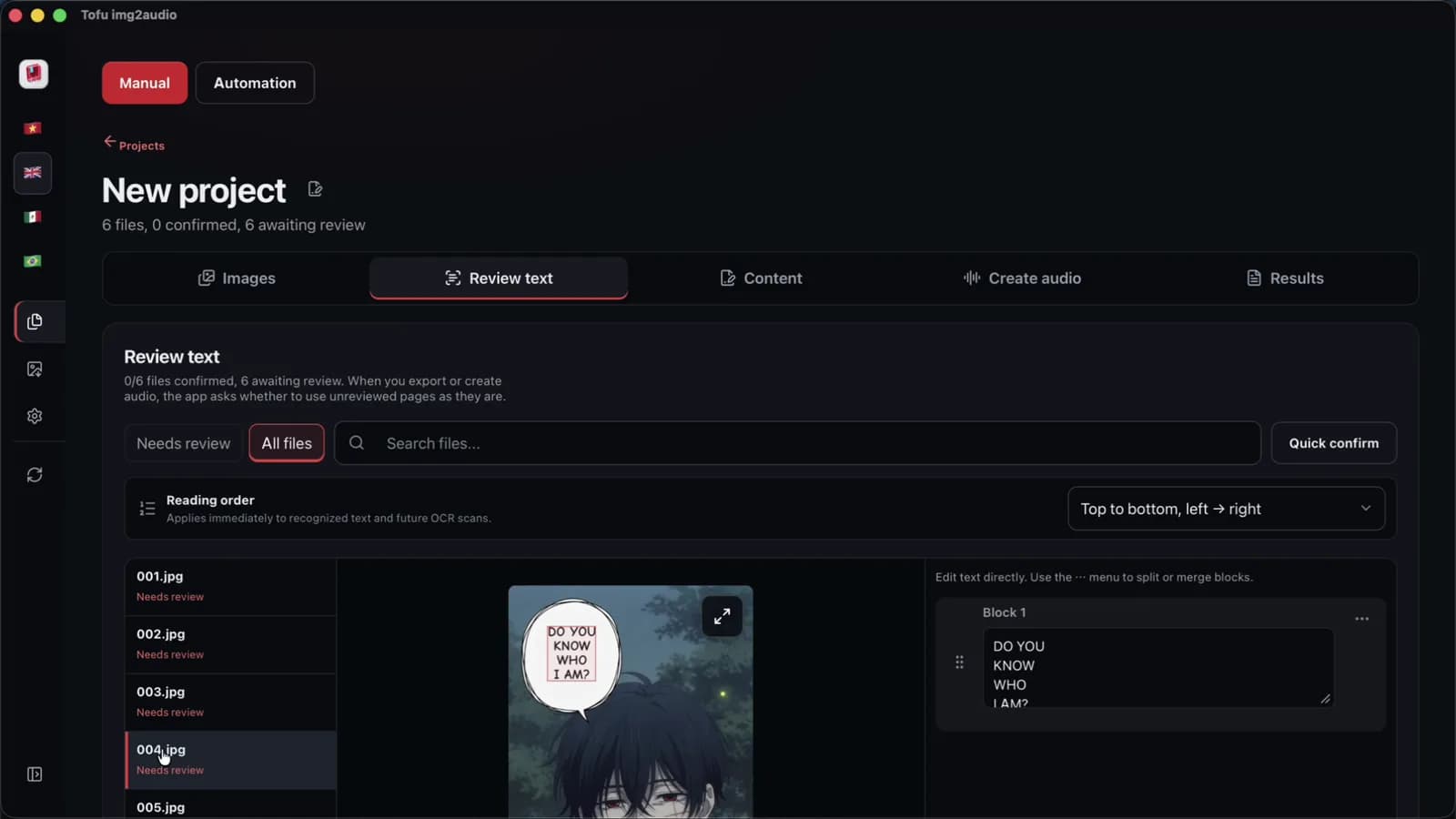
Step 2: What turns raw speech bubbles into a comic dub script?
A dub script is the cleaned dialogue with a speaker label on every line and the sound effects removed. Raw OCR text needs both fixes before any voice reads a line aloud. First, add the speaker labels. Second, delete the sound effects. The cleanup works with ChatGPT from OpenAI, Gemini from Google or Claude from Anthropic, using a locked character glossary. The glossary keeps names identical across episodes.
For instance, take two invented action panels from a chapter of 12 pages. Raw OCR gives `"[SFX: SLASH!] Sora: Drop the blade, Kael! Kael: Make me! [System: HP low]"`. A multi-voice script becomes `"SORA: Drop the blade, Kael! / KAEL: Make me!"`. A hybrid script rewrites the panels in 28 words: `"Sora blocked the strike as Kael stumbled back. 'Drop the blade, Kael!' Sora warned, but Kael grinned and refused to yield."` The prompt template is in manhwa recap script with AI.
Step 3: How do you cast comic dub voices listeners can tell apart?
Voice casting means picking one fixed AI voice per character for the whole series. Listeners tell characters apart by pitch, pace and tone, most of all when two characters argue in one panel. Tofu Image Text offers Microsoft Edge neural voices, the 129 CapCut voices listed in the app (counted on 2026-10-31), and offline voices on Windows 10 or later and Apple silicon Macs. ElevenLabs voices connect through the ElevenLabs API, and ElevenLabs bills the usage. For instance, two similar mid-pitch male voices on two rivals make an argument sound like one person talking to himself, with CapCut or Edge alike.
First, audition each candidate voice on a 30-word test line with names, numbers and a question: `"Wait, did Kael really clear Floor 15 with almost no mana left? No way, Sora saw the gate close at midnight!"` Finally, write the cast list down so Episode 12 matches Episode 1. The engines are compared in AI voice over for recap videos.
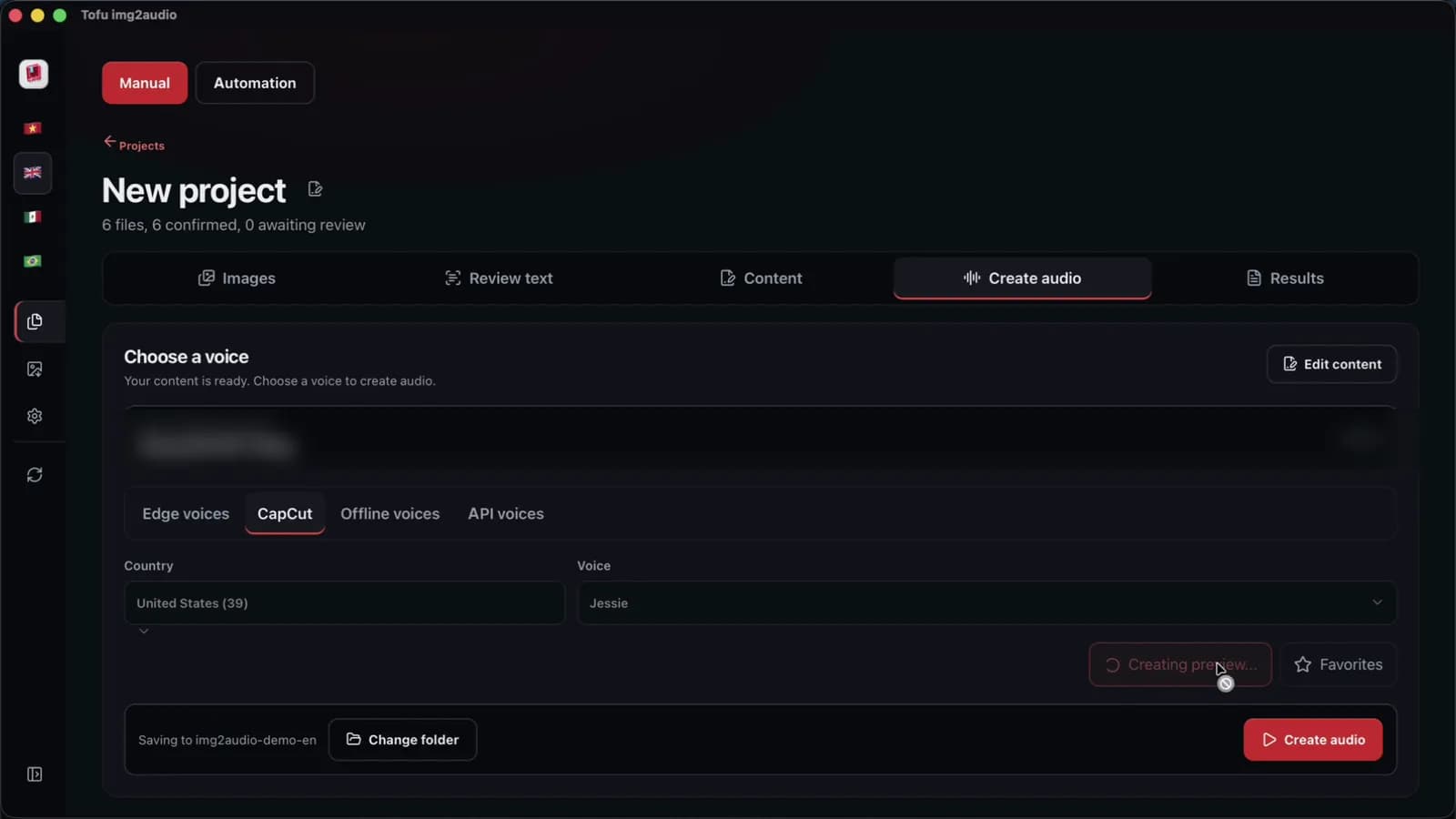
Step 4: When are free tools enough for a comic dub?
Free tools are enough when the comic dub is short. First, count the bubbles. For instance, for a strip of 2 pages, Windows Snipping Tool from Microsoft, Live Text from Apple and CapCut desktop cost $0 and handle a dozen lines. Say copying each bubble into a browser tool and renaming the clip takes one minute per line. Then a chapter with 90 bubbles takes 90 minutes of file handling.
Tofu Image Text is a pay-once desktop app for Windows 10 or later and Apple silicon Macs. The app reads chapter folders of PNG, JPG, WEBP, HEIC, TIFF or scanned PDF pages, shows each page beside the extracted text, and rewrites scripts with your own API key. The app exports TXT, Word (`.docx`) and one audio file per chapter, not MP4 video. For a multi-voice dub, split the script by speaker in a text editor first, then generate each character file with that character voice.
Step 5: How do you sync a comic dub in CapCut and upload it safely?
Syncing means lining up the voice track and the panels on the CapCut timeline in Step 5. First, put the voice track on the timeline before any image. Second, leave a short beat of silence between speakers, so fast arguments do not overlap. Finally, hold longer on reaction panels and add captions for viewers watching on mute. Details on using CapCut are in comic dub video in CapCut.
Before uploading, check the platform rules in the official help pages from Google, for example the two pages below. According to Google, dubbing full chapters without permission can lead to removals under the YouTube copyright strike rules. Since 2024, YouTube also asks creators to disclose realistic altered or synthetic media, such as a cloned human voice, under the YouTube GenAI disclosure rules. Read recap videos and copyright before the first upload. The section above is general information, not legal advice.
FAQ
Does a comic dub need a different AI voice for every character?
The answer is no: a comic dub is fine without a voice for every character. A hybrid dub works with one narrator plus two or three lead voices, which keeps the cast list short. For example, a fantasy chapter of 12 pages can use one Edge narrator from Microsoft, with CapCut voices for the hero and the rival. Minor characters can stay inside the narration, which keeps voice casting short. First, list the characters who speak in more than one chapter. Finally, give only those characters a fixed voice and write the choices in a simple cast sheet for the series.
What is the fastest format for a weekly comic dub channel?
The fastest comic dub format is a narrated recap, and the hybrid format comes second. A full dub is the slowest, because every bubble becomes a separate clip on the timeline, even with Microsoft Edge voices doing the reading. For example, a chapter with 90 bubbles gives 90 clips in a full dub, but only one narrator track in a recap. A hybrid dub adds a few voiced quotes on top of the narrator track with CapCut. First, publish a few episodes as a recap, for example 4 episodes of 12 pages each. Finally, add voiced quotes once the weekly routine feels steady and the cast sheet is ready.
How do you make AI voices sound more expressive in comic dub action scenes?
Expressive AI voice work is mostly a script job, not an engine setting, in a comic dub. Short sentences under 15 words, question marks and clean punctuation help Microsoft Edge and CapCut voices land natural inflection. In a chapter of 12 pages, `"Run. Now. The gate is closing!"` reads with more urgency than one long sentence with three commas. First, remove sound effects and stage directions in brackets, using a text editor. Finally, read the line aloud once with CapCut or Edge and split any sentence where a breath falls in the middle. In practice, a 25-word line can split into two shorter lines.
Next step: pick a short comic you have the right to use, choose a format, and dub one chapter from start to finish. Time each step, then decide whether free tools fit your schedule. To run OCR, the script and the voices in one app, see Tofu Image Text.