
Extract text from manga and manhwa pages (batch OCR)
Comic dialogue is part of the image. Here is how to extract text from a full chapter in reading order, fix the common OCR errors, and prepare a script.
OCR (optical character recognition) is the way to extract text from manga pages: the software reads every page of a chapter in panel reading order. The goal is clean dialogue, with sound effects removed and character names checked against the art. Comic pages are images, so the letters cannot be copied like web text. Office OCR also reads a page straight across, which mixes up panels. Scale matters too. For example, a chapter of 50 pages can hold more than a hundred speech bubbles, in Webtoon strips and classic manga pages alike. Checking every line, with Tofu Image Text or any OCR tool, is real work at that size. First, the sections below explain why copying fails and which four errors appear most. Then a worked example shows raw versus clean text. Finally, the guide compares free tools from Microsoft, Apple and Google with a batch desktop app. The last part is a workflow from Step 1 to Step 5 for a full chapter.
Why can you not copy text from manga and Webtoon pages?
A comic page is a flat image file, such as PNG, JPG or WEBP, where every letter is drawn into the art. No text layer sits under the bubbles, so there is nothing to select. Reading an episode from Webtoon in a desktop browser does not change the picture: the page loads image slices with zero selectable text. The only ways to extract text are retyping or OCR. First, look at the cost of retyping.
Retyping gets slow at chapter scale. For instance, say a chapter of 50 pages holds about 1,200 words of dialogue. At a typing pace of 40 words per minute, one chapter takes 30 minutes of typing, and a 30-chapter season takes 15 hours. The first step of any faster workflow is OCR on the whole folder, using Tofu Image Text or a similar batch tool.
What 4 errors appear when office OCR reads comic pages?
Office OCR is software built for invoices and letters, where text runs in straight lines. Comic pages are harder, because bubbles float across panels, tails curve and backgrounds are painted. For example, running office OCR on a chapter of 12 pages gives four errors again and again. Step 4 of the workflow below catches all four errors with a quick check beside each page, using Tofu Image Text or another review screen:
- First, row merging: the scanner reads straight across and joins a top-left question with a top-right reply.
- Second, tall strip shrinking: some browser OCR tools shrink a tall Webtoon strip before reading, which blurs small lettering.
- Third, dark System boxes: white or pale blue text inside dark RPG windows loses letters against the art.
- Finally, hand-drawn sound effects (`KRAAK`, `WHAM`) and fantasy names such as `Kaelen` turn into stray typos.
What does raw OCR output look like next to clean panel text?
Raw OCR output is the text exactly as the engine reads the pixels, before any human check. Checking raw text beside the page is the fastest way to catch a flipped order or a stray sound effect. An OCR engine cannot always tell whether big capital letters are a spoken shout or an explosion drawn across two panels. For instance, `BOOM` can land inside a line of dialogue.
Take three invented panels from a chapter of 12 pages: a status box, a double bubble and impact text. Row scanning gives: `"SYST3M M4NA LOW Run Jin! KRAAK Who broke the seal?"` The reply comes before the question, and typos leak into the status line. Finally, after panel-order extraction and a check beside the page in Step 4, the clean text reads: `"[System: Mana low] Jin: Who broke the seal? / Seo: Run, Jin!"` The clean text feeds the script step of writing a manhwa recap script with AI, using ChatGPT from OpenAI, Gemini from Google or Claude from Anthropic.
When do free tools extract text well enough?
Free tools are the right choice for a few panels at a time. For 1 to 5 panels, the tools built into Windows and macOS cost $0 and work right away. According to Microsoft, PowerToys Text Extractor copies text from any area of the screen with `Win + Shift + T`. According to Apple, Live Text in Preview on Mac lets you select text inside an image.
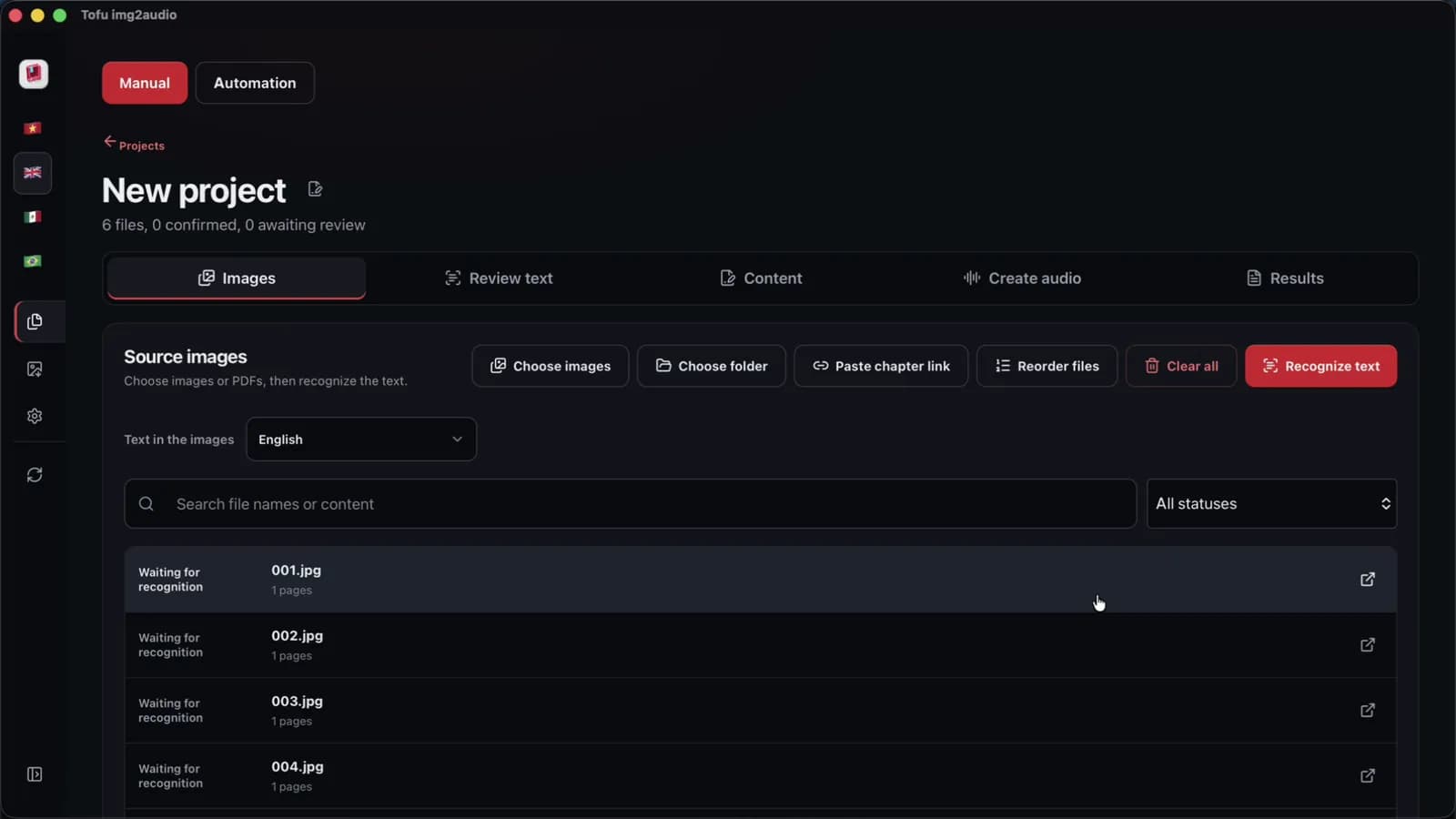
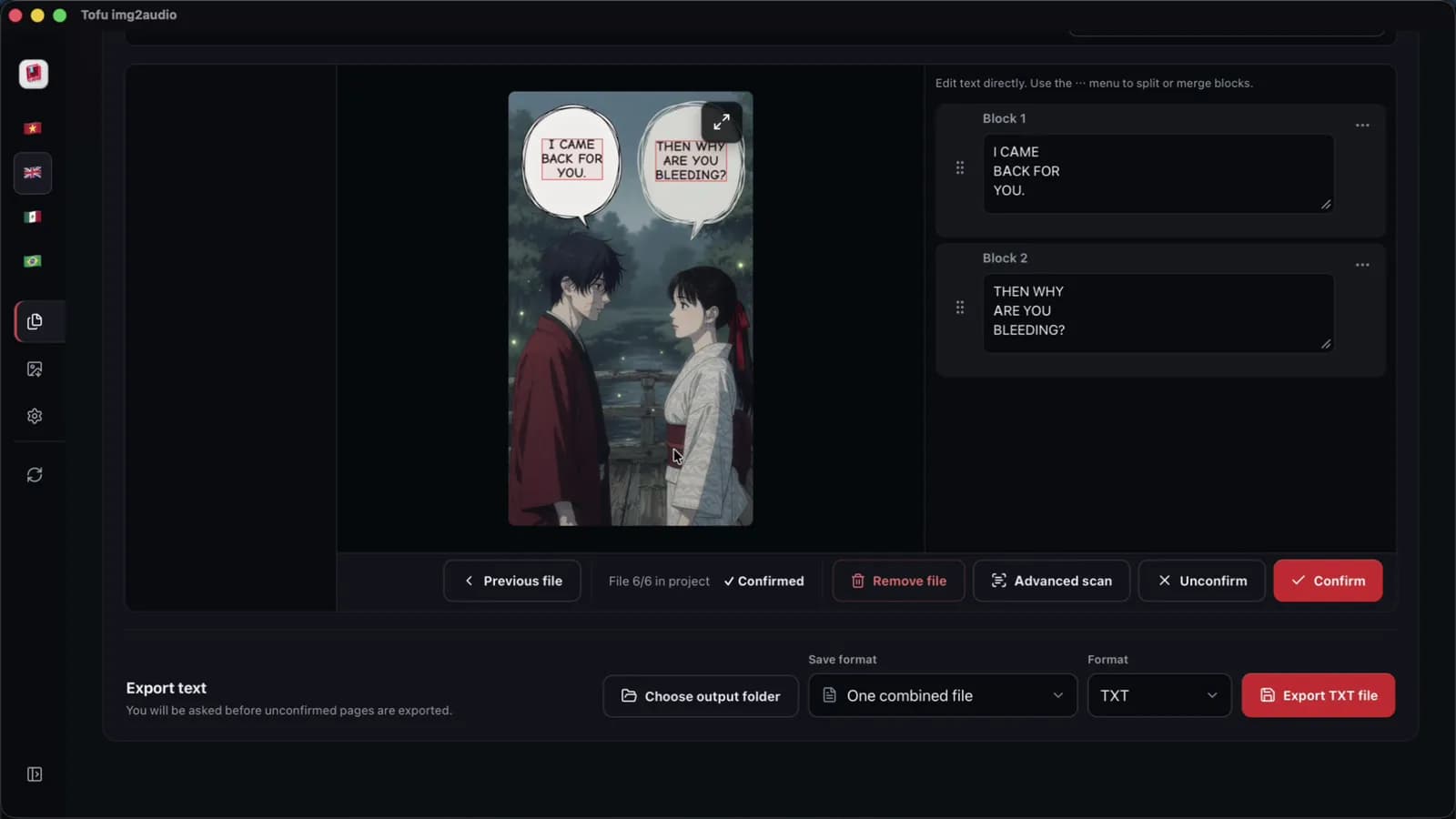
A chapter of 40 to 60 pages is a different job. Tofu Image Text is a pay-once desktop app for Windows 10 or later and Apple silicon Macs (M1 or later). The app reads a folder of PNG, JPG, WEBP, HEIC, TIFF or scanned PDF pages on the computer, shows each page beside its text, and exports TXT or Word (`.docx`). We measured OCR on a 6-page chapter at 2 seconds on an Apple M4 Pro, in one recorded run with short, clean sample pages. Accuracy on real scans is not measured yet, so names still need a human check.
How do you extract text from a full chapter in 5 steps?
A batch workflow is a fixed order of steps that treats one chapter folder as one job. For example, one folder of 50 pages keeps every page in sequence, and the character names get fixed in one pass using a glossary. Step 1 is the folder itself. Windows Explorer from Microsoft and Finder from Apple sort numbered files naturally. Simple batch tools sort `10.jpg` ahead of `2.jpg` when the zeros are missing.
- First, number every page with leading zeros, from 001 to 050, inside one chapter folder.
- Slice tall Webtoon strips in the blank gutter between panels, never through a bubble.
- Run OCR on the whole folder on your computer, so the page images are not uploaded.
- Check names, numbers and dark status boxes beside each page, and keep a fixed character glossary.
- Finally, export the TXT or Word file, then follow how to make manhwa recap videos and read recap videos and copyright.
FAQ
Can OCR extract text from stylized comic speech bubbles?
OCR works best on clean printed bubble lettering, and stylized text is the weak spot. Warped shouts, hand-drawn sound effects and handwritten notes are where errors cluster. For instance, a curved `NOOO!` across two panels may come out split or misspelled. First, run OCR on the whole chapter of 12 pages. Then check every stylized line beside the page in Step 4, with Tofu Image Text or another review screen. Finally, fix names once in the glossary, so later chapters stay consistent. A glossary also helps the AI script step, because ChatGPT, Gemini from Google and Claude copy the spelling they are given. Sound effects can usually be deleted outright, since a recap script does not read them aloud. Tofu Image Text shows each line next to the page, which makes the stylized lines easy to find on a quick pass.
Can you extract text from long vertical Webtoon strips?
A long strip from Webtoon, the Naver platform, is one very tall image, and the strip works best when split into pages first. Some tools shrink a very tall image before reading, which blurs small letters. Step 2 of the workflow handles the split. In practice, cut one long strip into 12 pages at the white gutters between panels. First, keep each cut away from the bubbles. Then number the pages with leading zeros, so the order stays right. Finally, run OCR on the folder with Tofu Image Text or another batch tool, and check each cut page beside the text. A clean cut also keeps each bubble whole, so no line of dialogue is split across two pages. The same folder can then go straight into Step 3, the recap script.
Are manga pages uploaded to a server when you extract text?
Tofu Image Text is a desktop app that reads the text on your computer using on-device OCR, so the page images are not uploaded for OCR. The app needs internet to check the license. In practice, Microsoft Edge and CapCut voices send the text to that voice service, and the AI script step sends text to the AI provider you choose. First, a chapter of 12 pages can go through OCR and review fully on the computer. Finally, you decide whether any text goes to an AI or voice service at all.
Next step: take one chapter you have the right to use, number the pages, and extract text from the whole folder once. Check the names beside the art, then move on to the script. To run OCR, review and export in one app, see Tofu Image Text.