
How to make manhwa recap videos with AI (full workflow)
Every manhwa recap video goes through five steps. Here is the full chapter-to-upload workflow, with real OCR and script examples and the places where creators lose time.
A manhwa recap video is a narrated summary of one comic chapter, built from the panels and a single voice track. Every manhwa recap follows five steps. Step 1 sorts the chapter pages into folders. Step 2 reads the speech bubbles with OCR (optical character recognition). Step 3 rewrites the dialogue into a script with AI. Step 4 turns the script into audio, and Step 5 lines the panels up with the audio in CapCut. For example, at a narration pace of 150 words per minute, a 750-word script gives a 5-minute chapter track. Free tools from Microsoft, Google and CapCut cover a first test video for $0. First, the guide walks through each step with a real failure case. Finally, the last sections cover free tools versus a desktop app, the YouTube monetization rules and the next step.
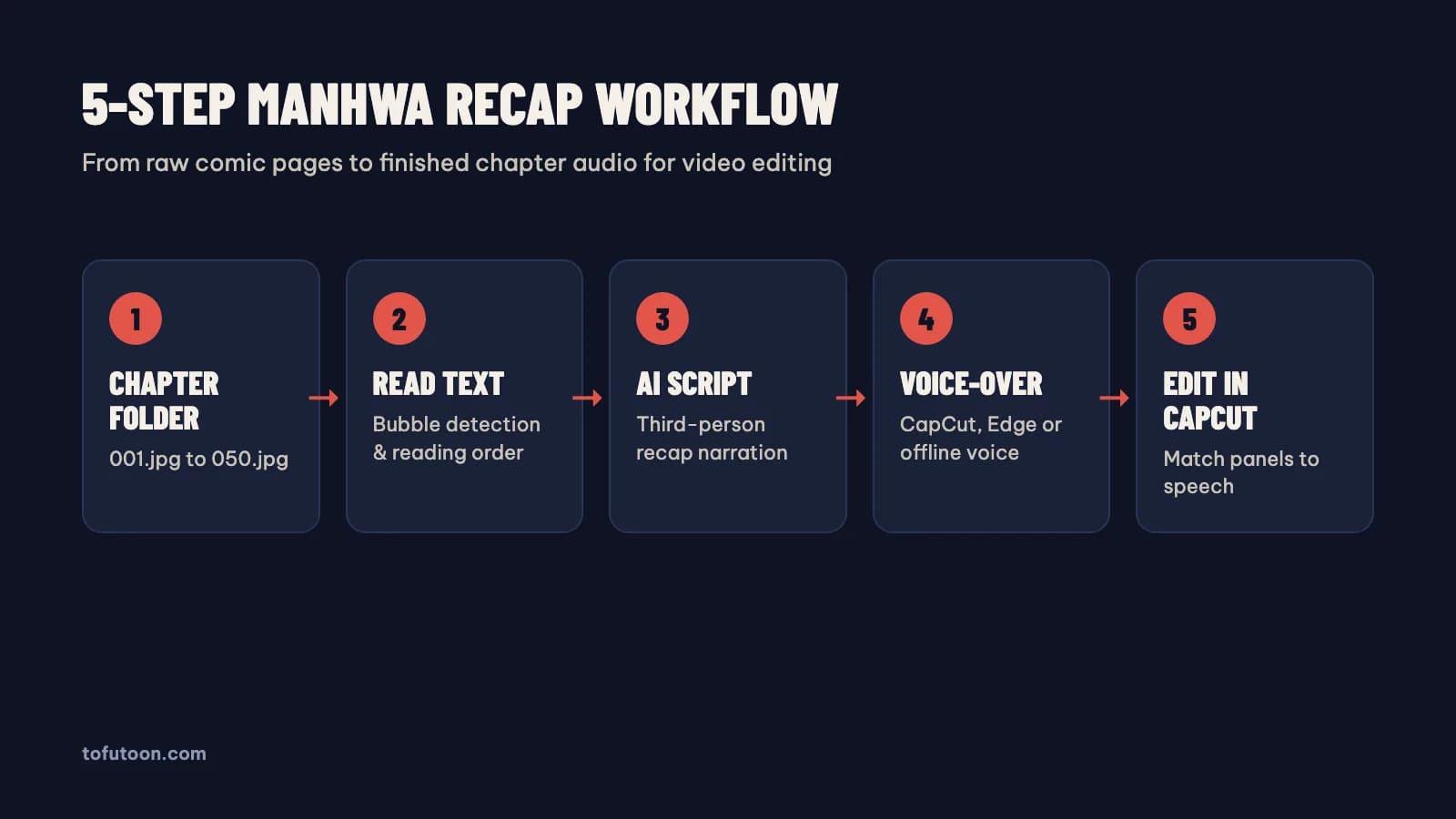
Step 1: How do you prepare chapter folders for a manhwa recap?
A chapter folder is one folder holding every page of one episode, numbered in reading order. This step decides whether every later step reads the pages in the right sequence. Name the pages with leading zeros, from `001.jpg` to `050.jpg`. For instance, folders opened with Microsoft Windows Explorer or Apple Finder sort numbers naturally. Many command-line tools and simple batch importers put `10.jpg` ahead of `2.jpg` when the zeros are missing. Two input mistakes ruin OCR before it starts. First, re-compressed social media images blur small lettering. Second, a tall strip saved from Webtoon and sliced through a speech bubble splits one line of dialogue across two files.
- Group the 40 to 60 pages of each episode in folders such as `chapter-01` and `chapter-02`.
- Keep the original PNG, JPG, WEBP, HEIC or TIFF files, or one scanned PDF per chapter.
- Work only with comics you have permission to adapt, or add real commentary of your own.
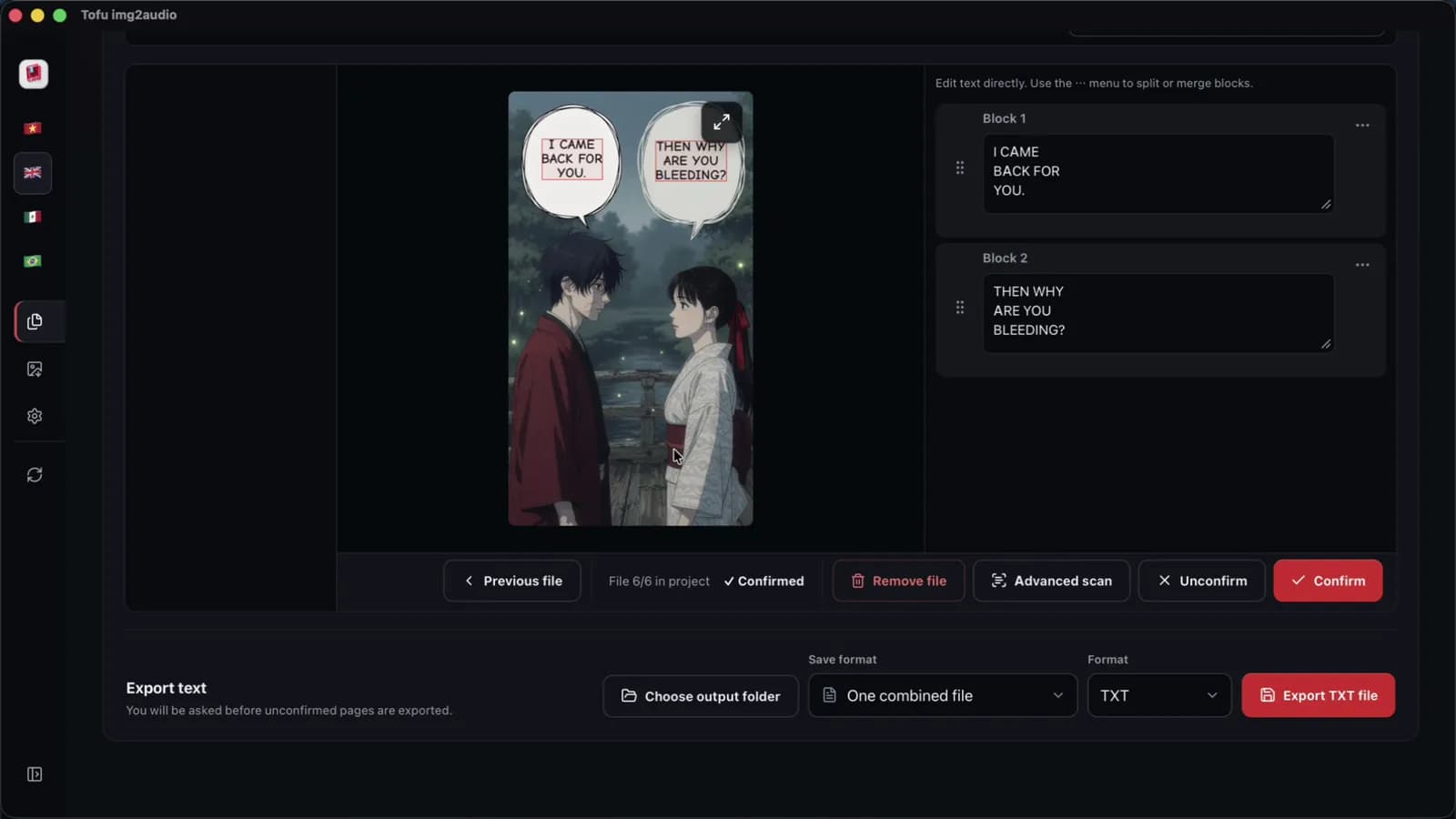
Step 2: Why does manhwa recap OCR need panel reading order?
Panel reading order is the path a reader follows through the bubbles on a page, panel by panel from top to bottom. Office OCR reads a page straight across, like a newspaper. A question in the top-left panel then ends up glued to the reply in the top-right panel. Three failures show up on action manhwa:
- First, double bubbles joined by a thin tail get flipped, so the reply plays before the question.
- Second, dark System status boxes lose pale blue or white letters.
- Finally, hand-drawn sound effects such as `KRAAK` or `BOOM` turn into stray symbols inside the dialogue.
The fix is a review screen with the page on one side and the text on the other. OCR review works best when each page sits next to the extracted bubbles in reading order with Tofu Image Text. In practice, a chapter of 12 pages with 2 bubbles per page gives 24 lines to check by eye. Cleanup steps are in extract text from manga pages.
Step 3: What turns raw OCR lines into a manhwa recap script?
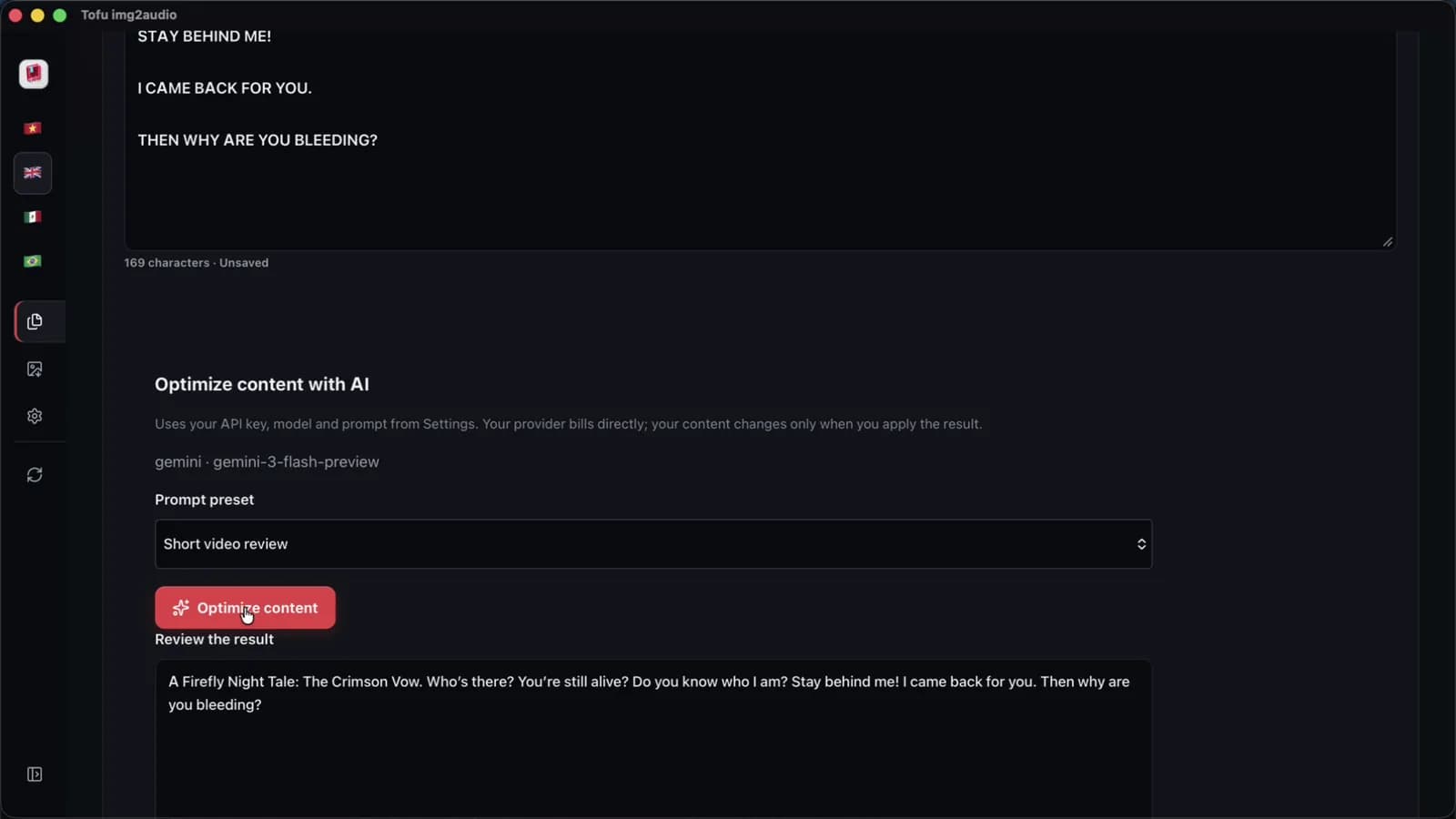
A recap script is third-person narration written from the raw dialogue, with a fixed list of character names. Raw bubbles, for example a one-word shout, are too short and too scattered to read aloud. Pasting raw OCR lines into ChatGPT from OpenAI, Gemini from Google, Claude from Anthropic, Grok or DeepSeek without rules causes two common problems. First, character names drift in spelling between Chapter 1 and Chapter 12. Second, 40-word sentences leave AI voices short of breath.
Take three invented dungeon panels, which give this raw OCR text: `"[System: Mana at 5%] Jin: Run, the boss is opening Gate 2! Han: We are out of time!"` A locked prompt turns the 23 raw words into narration: `"The system warned Jin that his mana was almost gone as the boss forced Gate 2 open. Jin shouted for the team to fall back, but Han saw the escape route was already closed."` The full prompt is in manhwa recap script with AI.
Step 4: Which AI voices keep a manhwa recap consistent?
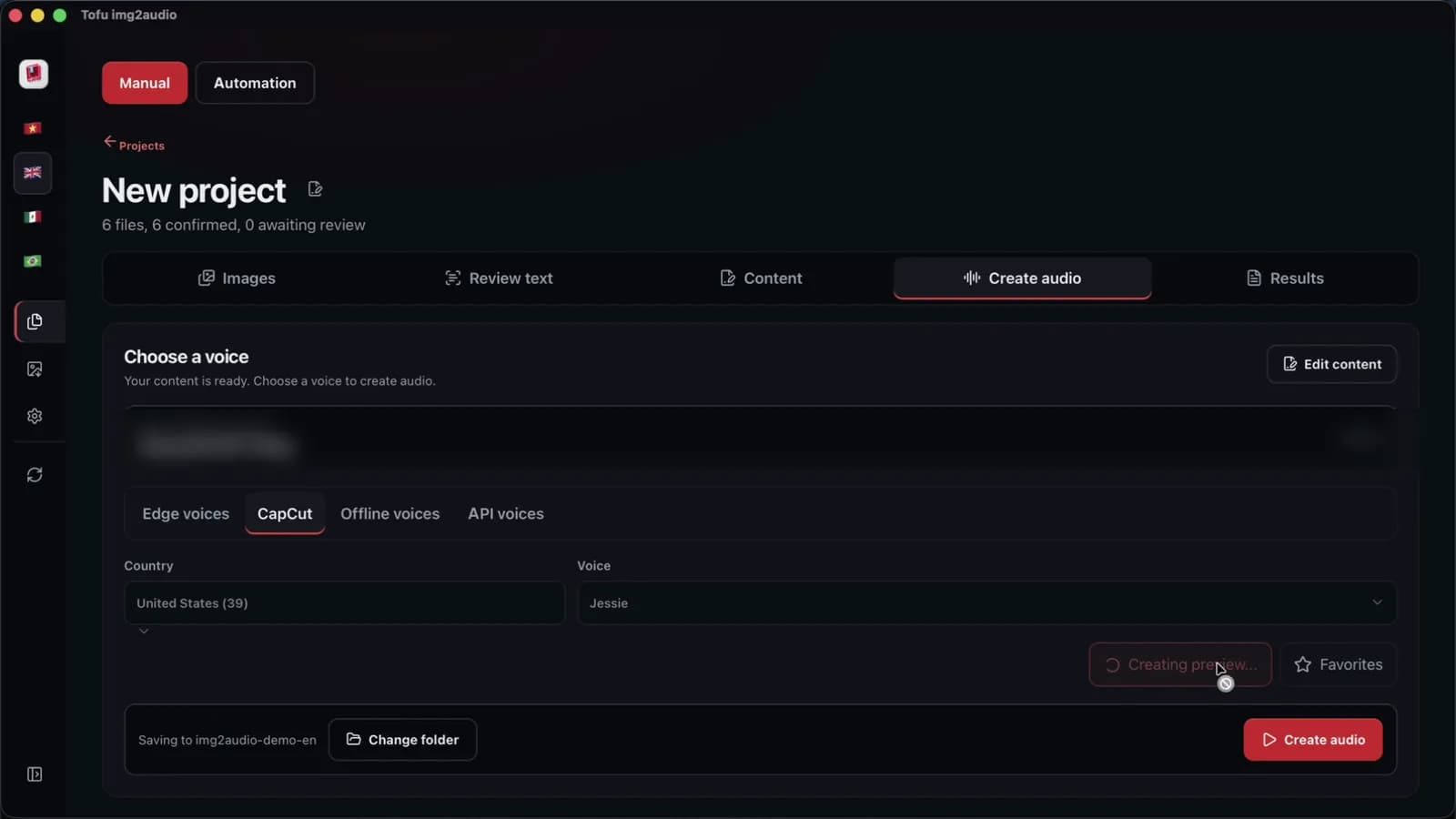
A narrator voice is the one AI voice that reads every chapter of a series. The choice comes before Episode 1. First, pick the voice and keep the same voice for the whole series. A switch halfway jars returning listeners. Tofu Image Text offers Microsoft Edge neural voices, CapCut voices and offline voices on the computer. ElevenLabs voices connect through the ElevenLabs API, and ElevenLabs bills the usage. At 150 words per minute, a 900-word chapter script fills about six minutes, so 3 chapters make an 18-minute YouTube episode.
We measured the CapCut voice step at 38 seconds for one 6-page chapter on an Apple M4 Pro, in one recorded run on 2026-10-30 with short sample pages. Online voices also depend on the network. Before any batch run, read a 60-word sample with names, numbers and a question through two or three candidate voices. Compare the engines in AI voice over for recap videos.
Step 5: Where do panels line up with the voice track in CapCut?
CapCut is the video editor where the panels meet the audio in Step 5. Put the chapter voice track on the timeline first, then stretch each panel to match the sentence being read. Audio-first editing gives a dramatic panel more screen time without cutting the voice file into dozens of clips. A short hold per panel with a slow zoom or a vertical pan keeps still art moving. A chapter of 12 pages can hold 30 or more panels, so the timeline fills quickly. For instance, using CapCut keyframes, one slow zoom per panel takes a few clicks.
- First, set CapCut desktop to a 16:9 canvas at 1080p and 30 frames per second for YouTube from Google, or 9:16 for YouTube Shorts.
- Second, drop the chapter audio on the timeline and trim long pauses between paragraphs.
- Finally, line up panels with the action beats and add captions, as shown in comic dub video in CapCut.
When are free tools enough for a manhwa recap channel?
Free tools are enough when the job is small. First, look at volume. For 1 to 3 screenshots or a first test video, Windows Snipping Tool from Microsoft, Live Text from Apple and a browser chatbot cost $0 and work well. The math changes with volume. Say copying, pasting and sorting take 20 minutes per chapter. Then a 30-chapter month adds up to 10 hours of manual prep.
Tofu Image Text is a pay-once desktop app for Windows 10 or later and Apple silicon Macs (M1 or later). The app runs OCR, the script and the voice in one place: OCR on the computer, AI rewriting with your own API key, and one audio file per chapter. We measured the automation queue at 2 minutes 40 seconds for three 12-page chapters on an Apple M4 Pro, in one run with short sample pages. Edge and CapCut voices send the script text to the voice service. The AI step sends text to your AI provider. The app exports TXT, Word (`.docx`) and audio, not MP4 video. Budgets are in recap channel costs.
What YouTube monetization rules apply to a manhwa recap channel?
YouTube monetization for a recap channel depends on original value, not on the voice. In practice, the same Edge voice can sit on a channel that monetizes and on one that does not. According to the YouTube channel monetization policies from Google, updated July 15, 2025, "repetitious content" is now called "inauthentic content". The policy targets mass-produced, template-driven videos and material read aloud without commentary or educational value. A recap channel needs analysis, narrative structure and editing choices of its own, using CapCut or any editor.
YouTube also asks creators to disclose realistic altered or synthetic media, such as a cloned human voice, under the YouTube GenAI disclosure rules. Copyright is a separate question from monetization. Crop to the panels the commentary needs, write your own analysis, and read recap videos and copyright before uploading. The section above is general information, not legal advice.
FAQ
How many words should a 10-minute manhwa recap script be?
A 10-minute manhwa recap script is about 1,500 words at a narration pace of 150 words per minute. The math is 10 × 150 = 1,500 words. A script of 750 to 900 words covers one chapter, so two or three chapters fill a 10-minute YouTube video. Microsoft Edge and CapCut voices read at slightly different speeds. For example, a fast voice with CapCut may finish a 900-word chapter sooner than a calm Edge voice from Microsoft. Time the first chapter of 12 pages with the chosen voice, then adjust the word target for the next chapters, and keep the same voice for the whole series.
Does Tofu Image Text export a finished MP4 video?
Tofu Image Text is an OCR and audio app, and the app does not export MP4 video. The exports are TXT, Word (.docx) and one audio file per chapter. The video edit happens in CapCut, the editor from ByteDance, or in another editor. For example, the audio step turns a chapter of 12 pages into one text file and one MP3 file in the output folder. Finally, the panels and the MP3 come together on the CapCut timeline, where zooms, captions and cuts happen. In practice, pacing, zooms and captions stay in the hands of the creator using CapCut.
Do you need to show your face on a manhwa recap channel?
A manhwa recap channel is a format where edited comic panels carry the picture. No face on camera is needed. The YouTube monetization policy from Google asks for original value, not a presenter. Add analysis to the script first, then make real editing choices using CapCut. Finally, keep the narrator voice the same across the series. For instance, a channel can end each chapter of 12 pages with a short opinion segment, read by the same narrator voice. Faceless formats are covered in [faceless YouTube channel with comic recaps](/blog/faceless-youtube-channel-comic-recaps).
Next step: pick one chapter you have the right to use and run the five steps once, from folder to finished audio. Time each step, then decide whether free tools fit your upload schedule. To run OCR, the AI script and the voice in one app, see Tofu Image Text.