
KDP Royalties Explained: 35% vs 70% and Print Costs
One cent on a paperback price can change your royalty by a dollar, and the 70% eBook band now reaches $12.99. Here is the math KDP uses.
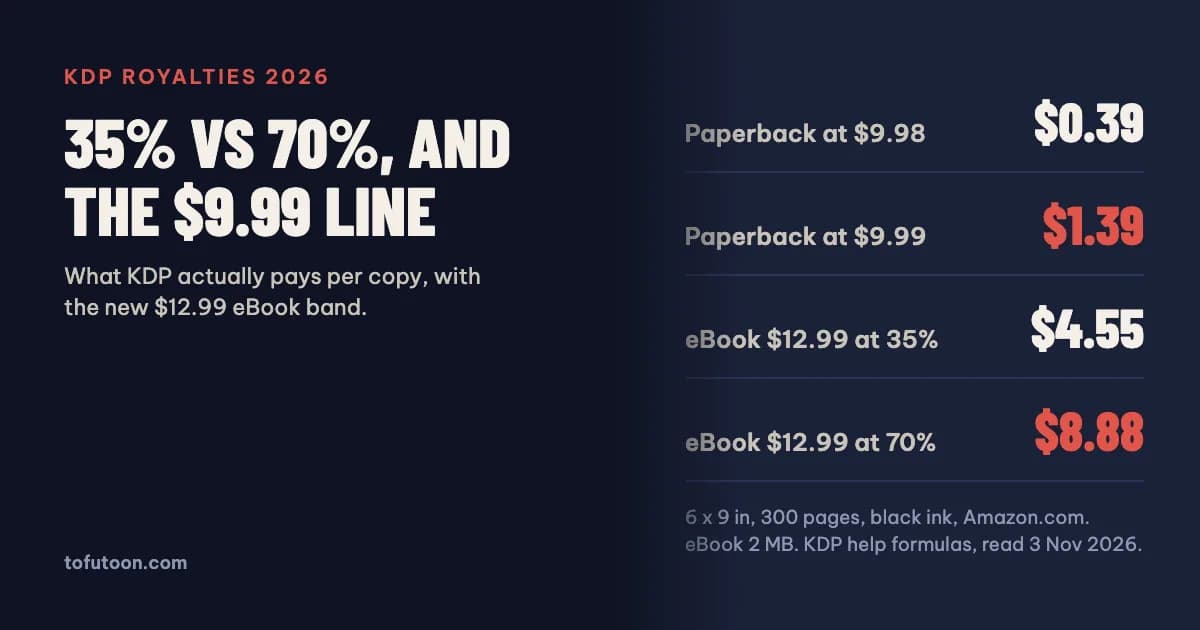
KDP royalties are the share of each sale that Amazon Kindle Direct Publishing pays you. eBooks earn 35% or 70% of the list price without VAT, and the 70% option subtracts a delivery cost per megabyte. Paperbacks earn 60% of the list price (50% below $9.99 on Amazon.com) minus the printing cost. Since July 7, 2026 the 70% eBook band runs from $2.99 to $12.99 instead of $9.99. Every number below comes from KDP’s own help pages, read on 3 November 2026.
How does KDP calculate eBook royalties?
The eBook royalty is a fixed share of the list price after VAT is taken out. On the 35% option, KDP pays 35% of that price and deducts nothing else. On the 70% option, according to KDP, the author gets 70% of the price after VAT minus a delivery cost based on file size, for sales in the 70% territories; sales outside those territories still earn 35% (KDP: eBook Royalties). A Bookshelf can therefore show both rates for one book, because Amazon.com sells worldwide and the rate follows the buyer’s location. Authors do not have to live in a 70% territory to choose it. One trap catches people who republish classics: works that are mainly public domain only qualify for 35%, unless the author adds substantial original content or a new translation. Worked example: a $4.99 eBook of 2 MB on Amazon.com earns 0.70 × ($4.99 − $0.30) = $3.28 at 70%, against $1.75 at 35%.
What changed in the 70% band in 2026?
The 70% band is the price range in which an eBook can use the 70% option. KDP raised its top on Amazon.com from $9.99 to $12.99, effective July 7, 2026, with matching changes in other marketplaces: £1.77–£12.99 on Amazon.co.uk and €2.69–€12.99 in the euro stores (KDP: eBook List Price Requirements). KDP says the $9.99 ceiling had been in place since 2007. Nothing switches automatically. A book priced at $11.99 that sat on 35% keeps 35% until the author changes the option. The gap is large: at $12.99 with a 2 MB file, 35% pays $4.55 per sale, while 70% pays 0.70 × ($12.99 − $0.30) = $8.88. Long non-fiction titles and series omnibus editions priced above $9.99 before July are the ones to check first. Older guides and calculators that still stop the 70% option at $9.99 give the wrong answer for these prices.
When does the 35% option pay more than 70%?
The 35% option pays more when the delivery cost is large, which happens with image-heavy files. The 70% option deducts $0.15 per MB on Amazon.com, £0.10 per MB on Amazon.co.uk and €0.12 per MB on Amazon.de and the other euro stores, with file sizes rounded up to the nearest kilobyte (KDP: Digital Book Pricing Page). For a novel of 1–2 MB the cost is a few cents. For a cookbook, a comic or a photo guide it can wipe out the gain. Take a 20 MB picture book at $4.99 on Amazon.com: delivery is $3.00, so 70% pays 0.70 × $1.99 = $1.39, while 35% pays $1.75. The fix is to resize photos to the size a reader actually sees, compress them, and check the file size KDP reports after upload. The 35% option has its own minimum price by file size: $0.99 under 3 MB, $1.99 from 3 MB and $2.99 from 10 MB.
How are paperback royalties calculated?
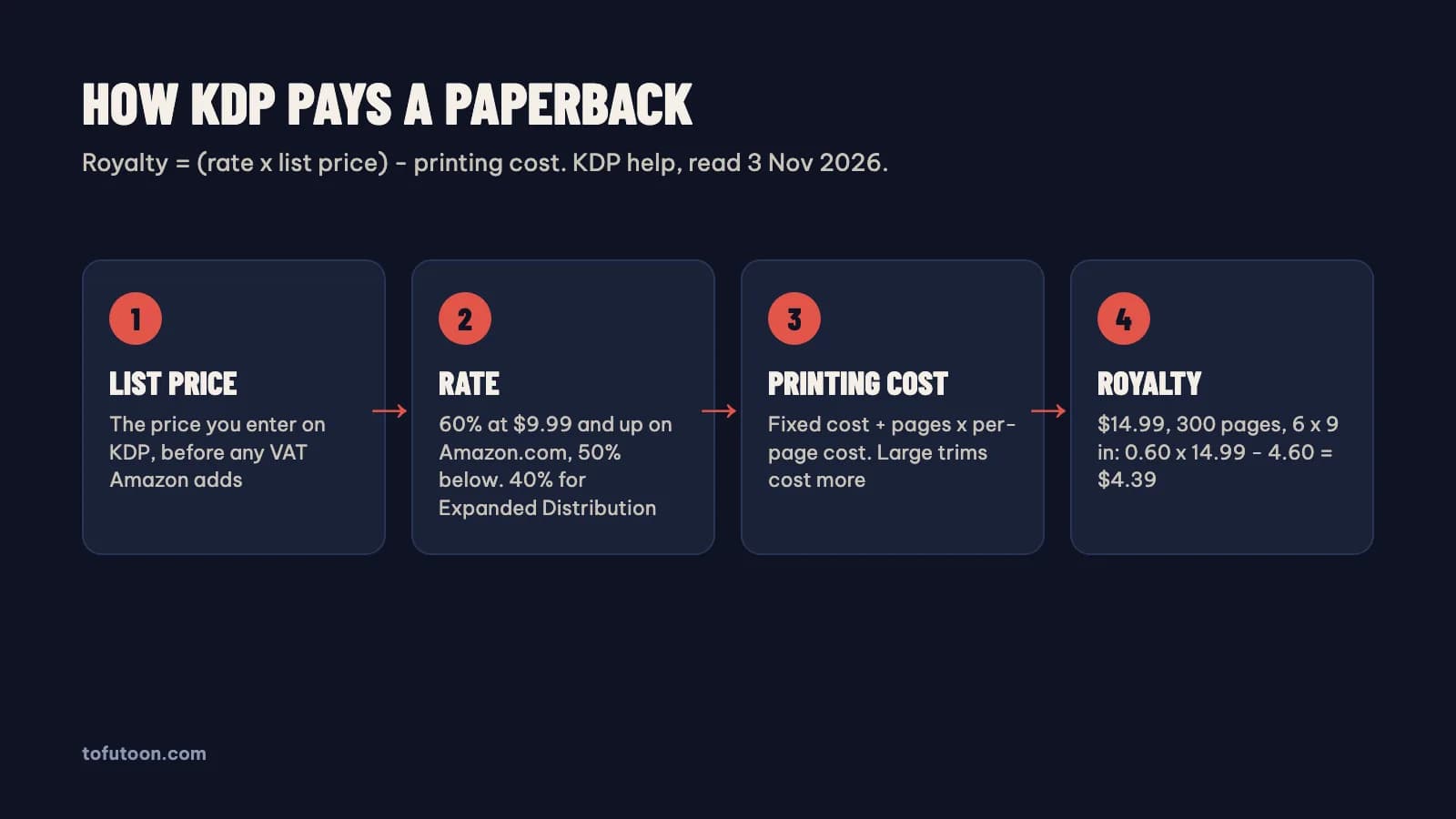
A paperback royalty is the rate times the list price, minus the printing cost. According to KDP, the rate is 60% at $9.99 and above on Amazon.com and 50% at $9.98 and below; the switch points are €9.99 in the euro stores and £7.99 on Amazon.co.uk (KDP: Paperback Royalty). That line matters more than it looks. A 6 × 9 inch, 300-page paperback with black ink costs $4.60 to print on Amazon.com. At $9.98 it earns 0.50 × $9.98 − $4.60 = $0.39. At $9.99 it earns 0.60 × $9.99 − $4.60 = $1.39, so one cent adds a dollar per copy. At $14.99 the same book earns $4.39. Through Expanded Distribution (bookstores and libraries) the rate is 40%, so the $14.99 book earns $1.40 there. A customer discount on Amazon does not lower the royalty.
What does KDP charge to print a paperback?
The printing cost is a fixed cost plus page count times a per-page cost, set by marketplace, ink, paper and trim size (KDP: Paperback Printing Cost). Page count also widens the spine, so the cover changes with it; KDP cover size and spine width shows that math. On Amazon.com a black-ink book of 110 to 828 pages costs $1.00 plus $0.012 per page, while books of 24 to 110 pages pay a flat $2.30. Large trims, wider than 6.12 inches or taller than 9 inches, cost $0.017 per page instead. When we worked through KDP’s tables, one result stood out for UK authors: the 6.14 × 9.21 inch size, close to the UK Royal format, counts as a large trim. A 300-page book at that size costs $6.10 to print against $4.60 at 6 × 9, so it earns $1.50 less per copy at the same price. Bleed and cover finish do not change the printing cost.
How do KDP royalties work on Amazon.co.uk and Amazon.de?
KDP royalties in Europe use the same formulas with local numbers. On Amazon.co.uk, a regular-trim black-ink paperback costs £0.85 plus £0.010 per page, so a 300-page book costs £3.85; at £9.99 it earns 0.60 × £9.99 − £3.85 = £2.14. In the euro stores the same book costs €0.75 plus €0.012 per page, so €4.35, and at €14.99 it earns €4.64. For print books, Amazon adds VAT on top of the list price in the UK and EU stores, and the royalty is worked out on the list price the author entered. eBooks work the other way: the list price includes VAT, and KDP takes the VAT out first. According to KDP, eBook VAT is 0% in the United Kingdom and 7% in Germany (KDP: How EU Taxes Affect eBooks List Price). A €4.99 eBook of 1 MB sold on Amazon.de therefore earns 0.70 × (€4.99 − €0.33 − €0.12) = €3.18 at 70%.
Checklist before you publish
- Pick the trim size first. It decides whether you pay the large-trim printing rate.
- Format the interior, then read the real page count from the print PDF. A count guessed from the word count can be far off once fonts, margins and chapter breaks are set.
- Get the exact cover size and spine width from that page count with our free KDP cover calculator.
- Price each marketplace by hand: at or above $9.99, €9.99 and £7.99 for paperbacks, and inside the 70% band for eBooks. The free KDP royalty calculator runs these formulas for each marketplace.
- Check the royalty KDP shows on the pricing tab before you press publish. KDP’s own numbers win if anything here ever differs.
A note on limits: these formulas cover Amazon sales only. Kindle Unlimited page reads are paid from a monthly fund and are not covered here, and tax withheld on payments depends on your tax interview. Rates change, so this page states the date it was checked.
FAQ
What is the KDP royalty on a $9.99 eBook?
A $9.99 eBook on the 70% option with a 1 MB file earns 0.70 × ($9.99 − $0.15) = $6.89 per sale on Amazon.com, according to the KDP formula. On the 35% option the same sale earns $3.50. Every extra megabyte lowers the 70% figure by about $0.11, because KDP deducts $0.15 per MB before applying 70%.
Can an eBook priced at $11.99 get the 70% royalty?
Yes. Since July 7, 2026 the 70% band on Amazon.com is $2.99 to $12.99, so an $11.99 eBook qualifies. Books that were already published keep their old royalty option until the author changes it on the KDP pricing tab, so an $11.99 title set to 35% before July still earns 35% today.
Why is my paperback royalty so low?
A low paperback royalty usually has one of three causes: a list price below $9.99 on Amazon.com, which drops the rate from 60% to 50%; a large trim size such as 6.14 × 9.21 inches, which raises the per-page printing cost from $0.012 to $0.017; or a high page count. Check all three against the KDP printing cost table.
Next step: get your real page count, test prices in the KDP royalty calculator, and size the cover with the KDP cover calculator. Formatting the interior next? A pay-once desktop formatter for Windows and Mac is in development here, exporting a print PDF and an EPUB from a Word manuscript, offline. Join the waitlist and tell us what you need.