
Faceless channel ideas: 12 formats and the catch in each
Ideas are the cheap part. These twelve are sorted by what you already have, books, a skill, records or a pen, with a first video and an honest catch for each.
You don't need a list of 100 faceless channel ideas, because there's no shortage of ideas. What runs out is the part only you can add, and it runs out fast when the idea came off someone's list. So we've sorted twelve formats by the raw material behind them. Start from what you already have or already know, and the channel has a better chance of outlasting your first burst of motivation. Each one comes with a first video you could make this month and the catch to expect. If you want topics compared by demand and policy risk instead, see our faceless YouTube niches.
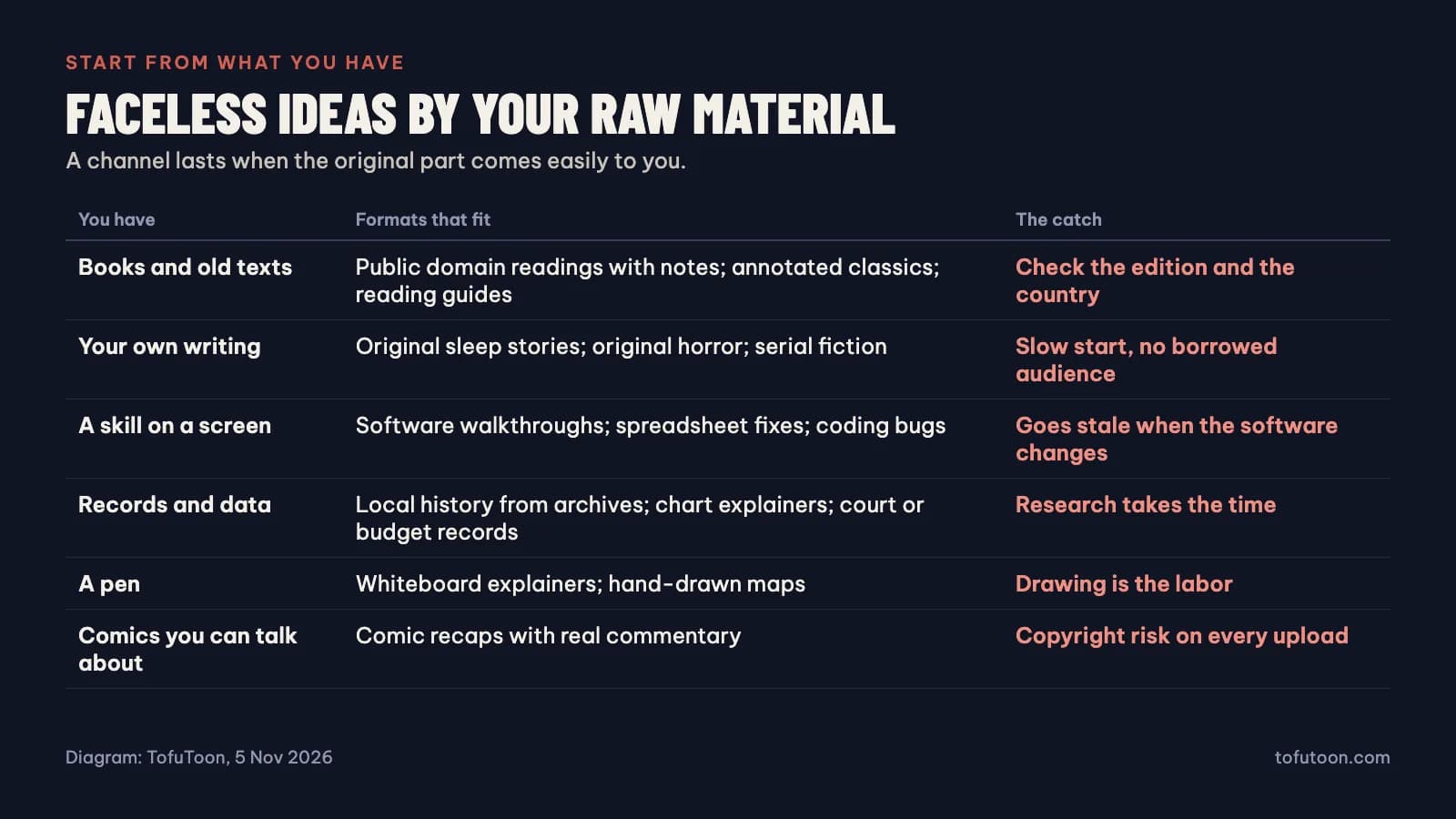
Readers: books and old texts
1. Public domain readings with notes
Read a classic chapter by chapter, adding a short note on what's going on or what an old word means. Your first video is one chapter and three minutes of your own notes. For scale, chapter one of Pride and Prejudice took under five minutes in an Edge voice with edge-tts 7.3.1, and the novel has 61 chapters, so you won't run short of material. The trouble is that anyone can upload the same words, so your notes are what make it a channel. Check that the edition is public domain where you live. Files from Project Gutenberg come with a license worth reading too.
2. One classic, explained slowly
Skip the recitation and share your understanding of a difficult book, one idea per video. Open with the passage that changed how you think, explained for a smart friend. It takes real reading, which is also why it's hard to copy.
3. Reading guides for set texts
Students search for help with the same school books every year. Try the five things to notice in one chapter of a book you know well. Demand follows the school calendar, and you have to beat a free summary, so stay out of "just give me the answers" territory.
Writers: your own stories
4. Original sleep stories
Slow, gentle, nothing happens, and it's all yours. A good first one is 20 minutes of a quiet walk through an invented town. At the 168 to 193 words a minute Edge voices managed with edge-tts 7.3.1, that's about 3,400 to 3,900 words before you slow the voice down. That's a lot of writing for one video. Aim it at children and YouTube requires you to mark it as made for kids.
5. Original horror or serial fiction
Short scary stories you wrote, read by one steady voice, with simple art. Begin with five minutes and one good twist. Expect a slow start, since there's no borrowed audience. In return the story is yours, and so is the whole catalog if it ever becomes a book.
A skill you can show: a screen is enough
6. Software walkthroughs
Screen recording plus voice, one task per video. Record the fix for a problem you spent an hour on last month. These go stale when the software changes, so budget to redo your best ones. Your own voice works best here, because people trust someone who has clearly done the task.
7. Spreadsheet or code bug fixes
Show a broken file, then fix it on screen, explaining as you go. The error you see most at work makes a good first video, rebuilt with made-up data. Never show real company data. The audience is narrow, though the people in it have an actual problem.
Diggers: records and data
8. Local history from archives
A town, a street, a forgotten event, from local records and old newspapers. Pick one building near you and find out what used to happen there. Research takes the time and the audience starts small, but a template factory won't compete with you. Check rights on old photos before you use them.
9. Charts that explain something
Take one public dataset and animate one finding, starting with a chart that surprised you and your explanation of why. Get the numbers right, because comments will tell you when you don't, and cite your sources on screen.
People who draw: a pen is enough
10. Whiteboard explainers
Your hand and a marker explaining one idea, beginning with the concept you always end up explaining to people. Drawing is slow. It's also visibly yours, which is the point.
11. Hand-drawn maps
Draw the map of a battle, a trade route or a story world as you talk through it. Try one journey from a book you love. Plan short videos while you learn how long each one takes.
Comic readers: recaps, with the risk stated plainly
12. Comic recaps with real commentary
Retell a chapter over its panels and add what you think about it. The art and story already exist, so this is one of the faster formats on this list. It's also the format we build tools for, so note our interest. The catch is big: the art belongs to someone else on every upload. A takedown or a copyright strike can come from any of them. Some publishers actively enforce, and commentary doesn't make a recap safe. Read recap videos and copyright first, and the comic recap channel plan if you still want to go ahead. Using comics you drew or licensed removes the worst of this risk. Whatever you recap, a chapter you've read twice, with your own view of what's coming, makes a better first video than a straight retelling.
On this route, typing out dialogue is the mechanical part. Tofu Image Text reads the bubbles on your computer, lets you check them next to the page, and saves one audio file per chapter, with no video export. It won't write your opinions, and those are what the channel is built on.
Ideas we would skip
These still fill idea lists, and we wouldn't start one in 2026. All of them are easy to produce and easy to swap for each other, which is what YouTube's monetization policies warn about:
- AI slideshows of "facts". Image slideshows with minimal narrative are named on the policy page.
- Reading Reddit posts over gameplay. Interchangeable, and the post belongs to its author.
- Top 10 lists over stock footage, unless you bring your own research.
- Quote compilations. Same problem, with a nicer font.
- Clips of other people's shows with a few words on top. That falls under reused content, and adds copyright risk as well.
Test any idea before you commit
Before you buy a microphone or a tool, spend one weekend on this:
- Write ten video titles. If you get stuck at six, that tells you something.
- Swap the titles between videos in your head. If they still fit, the videos are interchangeable.
- Make one video, badly, and log the hours for each step.
- Multiply those hours by a year of your realistic schedule. Be honest about that number.
For demand, a quick check is enough. Google Keyword Planner shows about 590 US searches a month for "faceless youtube channel ideas" and 5,400 for "audiobooks on youtube", which shows interest and nothing more. Type your topic into YouTube search and see what it suggests, then watch the top three videos and ask what you'd do differently. No answer? Try the next idea. No format here promises views or income, and we'd distrust anyone who says theirs does.
FAQ
What is the easiest faceless channel to start?
The one you already have material for. Software walkthroughs need only a screen recorder and a task you know. Comic recaps look easier, but they carry copyright risk, and easy formats attract the most copies.
Do faceless channels need an AI voice?
No. Your own voice works and is often better for tutorials. AI narration makes more sense for long readings and fiction. Either way, keep one voice per series.
How much does a faceless channel cost to start?
It can be almost nothing: a free editor, free voices and time. Time is the real cost, which is why you should log your hours on the first video. Our [recap channel cost post](/blog/recap-channel-cost) has a budget formula you can adapt to other formats.
Choose the raw material you already have, pick one format above, and write your ten titles tonight. When writing comes easily and narration is the slow part, Tofu Voice turns a folder of scripts into one MP3 per file. Before you scale anything, read what the rules allow when you automate.