
Faceless YouTube automation: what the rules allow
YouTube does not ban automation tools. It bans the result when every video could be swapped for the next. Here is where we would draw the line, step by step.
Faceless YouTube automation is fine by YouTube's written rules right up to the point where your videos become interchangeable. The policy doesn't mention your tools. It cares about what comes out: is it your original creation, or could anyone have pressed the same button? So the useful question is which steps to automate, and we'd hand off far more of the typing than of the thinking.
We make a tool that automates part of a video pipeline, so we have a stake here. We also don't want to sell it to someone who'll lose their channel because of how they used it. Everything below about policy comes from YouTube's own pages, as read on 5 November 2026.
What the inauthentic content policy says
On July 15, 2025, YouTube renamed its "repetitious content" policy to "inauthentic content", and called that a minor update. Its note says this kind of content has always been ineligible for monetization, and that the reused content policy did not change. You'll see articles describing later overhauls. The change note at the top of the channel monetization policies still lists that July 2025 date as the latest for this policy, so ask for a link when someone cites something newer.
The page's examples are concrete. Fine: the same intro and outro when the bulk of each video differs, and a series with the same characters where each episode has its own storyline. Not fine: videos so alike they're interchangeable, image slideshows or scrolling text with minimal narrative or commentary, templated stories, and AI-made generic templates that feel mass-produced and carry no original insight. Read that last one again: it names generic and mass-produced content, and AI only as one way to get there.
Where we would stop automating, step by step
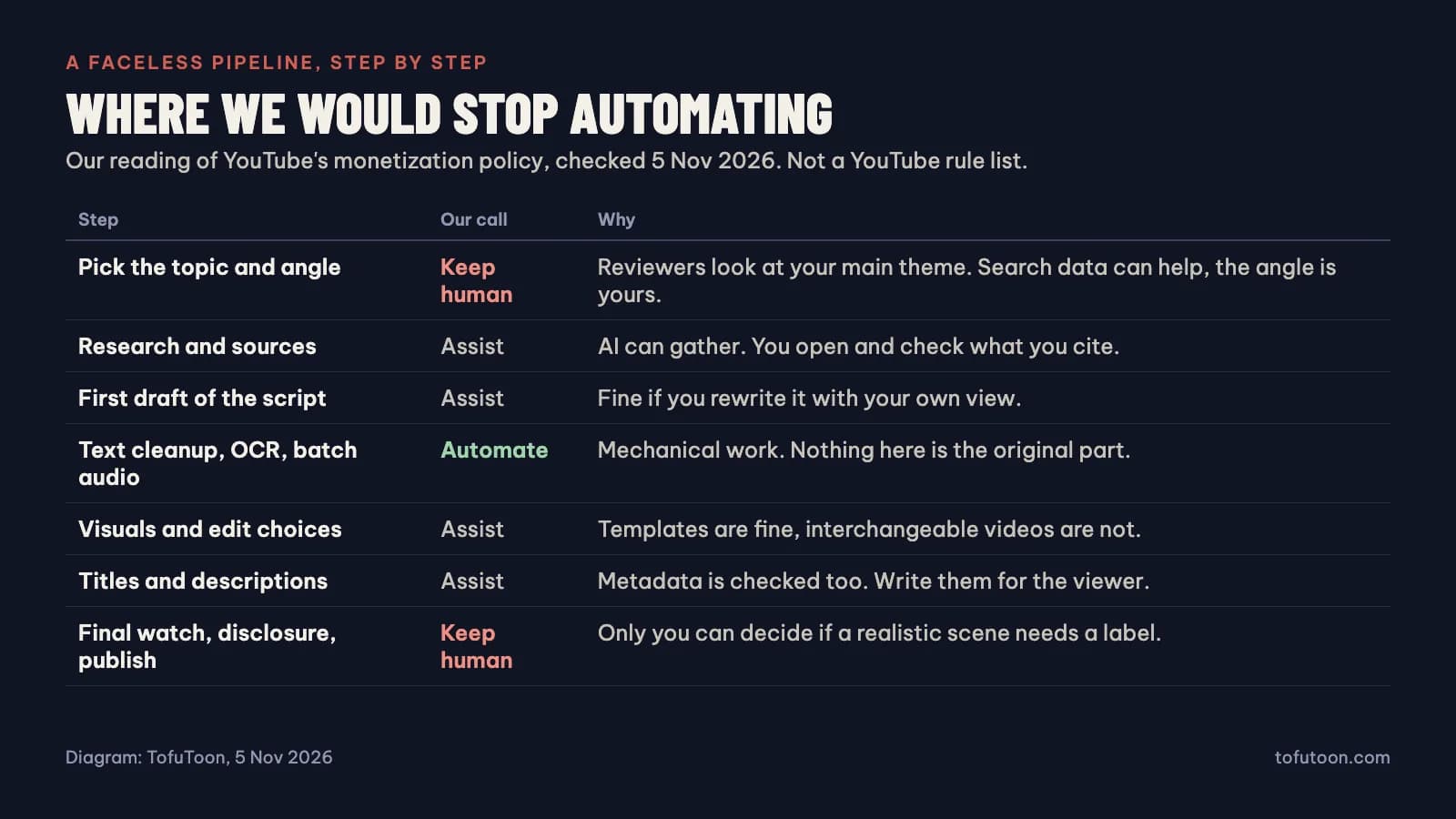
This is our judgment and not a YouTube list. The topic and angle stay with you. Reviewers may look at your channel's main theme, and an angle is the one thing a template can't supply. Research and the first script draft can get help, but open what you cite. AI will produce confident errors, and a fixed prompt produces the same shape of video every time. So rewrite it until it says something you'd defend.
Mechanical work is the safe place to automate: OCR, cleaning text, naming files, generating narration in batches. Nothing original happens in those steps, so nothing original gets lost. Visuals sit in between. Templates are fine, but if your visuals could sit under any script, you've built the slideshow the policy describes. Titles and descriptions are reviewed too, so write them for a viewer. The final watch stays with you, because only you can decide whether a realistic scene needs a label.
What software is actually good for
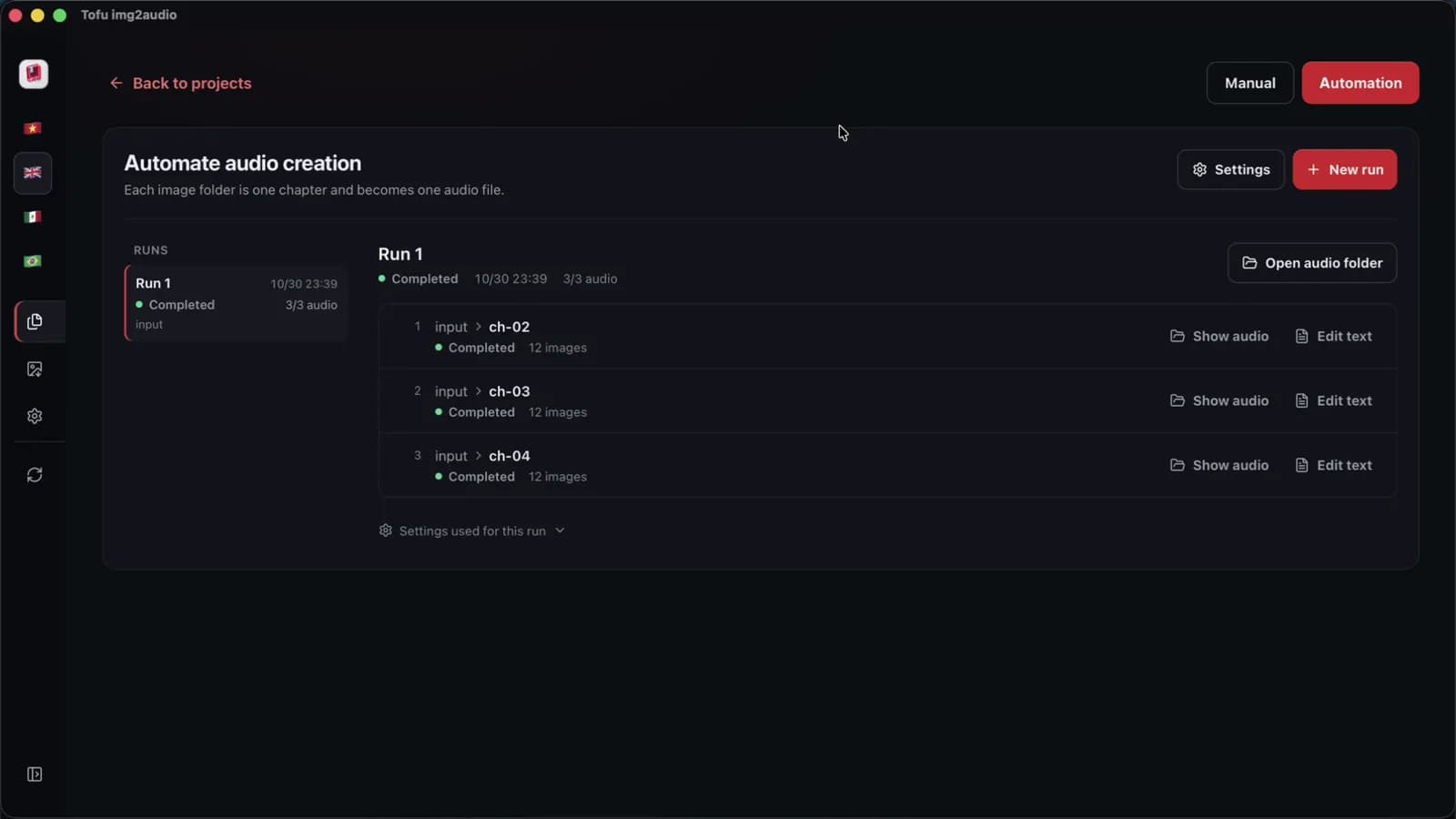
Software is good at the mechanical steps, and that part we can measure. In one recorded run on an Apple M4 Pro, our Tofu Image Text app queued three chapters of 12 short sample pages, read the text, wrote a script with an AI key, made the audio and saved one file per chapter, all in 2 minutes 40 seconds. That takes care of the typing. It also makes you the reviewer of three scripts you didn't write, and that review is what you must not skip. The queue doesn't add your opinion, make the video or upload anything, as the app exports no MP4. Your provider, voice and network will change those timings, and OCR accuracy hasn't been measured.
Auto-uploading: technically easy, and the step we would skip
YouTube's API does allow it. Google's quota table lists a default of 100 video uploads and 100 search calls a day, plus 10,000 units for other endpoints, resetting at midnight Pacific. The current upload docs say videos from unverified API projects are not restricted to private, so older warnings are out of date, and there's a field for declaring synthetic media. So a daily schedule won't hit a technical wall.
We'd still leave this step human for a long time. Upload is the last moment someone watches the video before it represents your channel. A scheduled queue removes that moment for little gain, since dragging a file takes a minute. Save the API for when you have a person checking every video and a real volume problem. A new channel has the opposite problem.
Disclosure: what actually needs a label
The altered content page is more narrow than many people assume. You must disclose content that makes a real person appear to say or do something they didn't, alters real events or places, or generates a realistic scene that never happened. You don't need to disclose clearly unrealistic content, minor edits, or AI used for scripts, outlines, thumbnails, titles, captions or ideas. Neither does a clone of your own voice reading your own voice-overs. So a synthetic narrator over drawn panels looks like a no. An AI "documentary" with a realistic fake scene of a real event looks like a yes. If you're not sure, disclose.
The other meaning: running a channel with a team
In creator circles "YouTube automation" also means paying writers, editors and voice artists while you run the channel. That's just a production company, and nothing in the policy objects to it, if the result is original. Two warnings apply. Buying views, subscribers or engagement breaks the spam and deceptive practices rules, and no workflow makes that fine. And watch who is selling this. Search for the term and you'll see course ads before you see anything useful. Nobody can promise you income from a channel that doesn't exist yet, and if a course's main proof is its founder's revenue screenshot, close the tab.
How to decide what to automate first
Don't start by designing a pipeline. Make three videos by hand and log your hours for each step. You'll probably find that one or two mechanical steps eat most of the time, and those are your first candidates. If typing dialogue from scanned pages is the time sink, OCR will help. If narration takes the time, batch voices will. If research is what takes the time, be careful: that may be the part that makes your channel worth watching. Our post on faceless YouTube niches sorts topics by how much of this you'd have to do yourself.
FAQ
Will using AI get my channel demonetized?
Using AI alone isn't what the policy names. Mass-produced, generic and interchangeable content is. A channel can use AI throughout and pass, or use none and fail. Check your last ten videos: if they could swap titles, fix that first.
How many videos a day is too many?
YouTube publishes no number, and we won't invent one. The volume isn't the test. Volume does make it hard for one person to add anything original to each video, so that's where to look.
Can I automate a comic recap channel?
You can automate OCR and narration, and we build a tool that does. You can't automate your commentary or the rights question. Recaps use someone else's art, so read [recap videos and copyright](/blog/recap-videos-copyright) before you scale anything.
Log your hours on three videos, then automate only the single most mechanical step. For scanned or comic pages, the Tofu Image Text queue handles text and audio. For finished scripts, Tofu Voice handles folders of narration. Watch every video before it goes out, whatever you automate.