
Best OCR software for PC: free, cloud and batch options
The best OCR software depends on the job: one screenshot, a private folder of scans, or a searchable archive. Here is how the main options compare, and how to test them.
OCR software is a program that reads the letters in an image or a scan and turns them into editable text. No single tool is best for every job, so the useful question is the job itself. A single screenshot needs a free tool from Microsoft or Apple. A clean public document fits Google Drive. A private folder of 40 pages needs OCR that runs on the computer and keeps the pages in order. For example, retyping 1,500 words at 40 words per minute takes about 37 minutes, while a free OCR tool copies the same words in a few clicks per page. The guide first lists the options, then five questions for choosing. Finally, the guide shows how to test any OCR software on your own files, since accuracy on your own scans is the only number worth trusting.
Which OCR software options exist for Windows and Mac?
OCR software on a PC falls into four groups. First, free system tools: PowerToys Text Extractor from Microsoft copies text from any area of the screen, and Live Text in Preview from Apple copies text from an image. Second, cloud OCR: Google Drive converts PDFs and .jpeg, .png or .gif photos when you open the file with Google Docs, within limits such as 2 MB per file, according to the Drive OCR help page. Third, open-source engines: Tesseract is an Apache-2.0 OCR engine that recognizes more than 100 languages, but Tesseract is a command-line tool for technical users. Finally, desktop apps: paid apps add batch folders, review screens and exports such as Word or searchable PDF. In practice, a free tool for quick jobs plus one desktop app for big jobs covers both kinds of work.
How do you choose OCR software for your files?
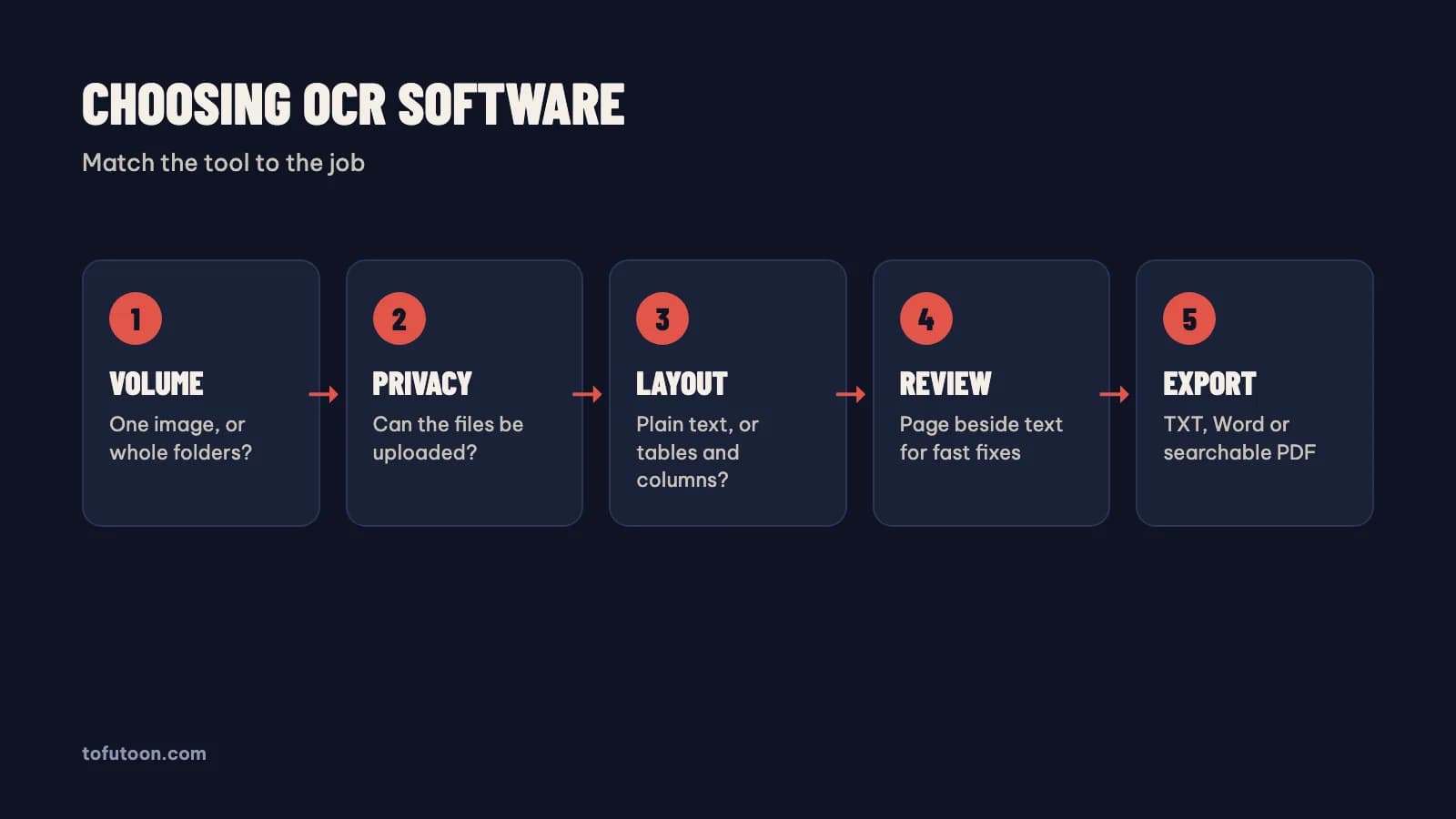
Choosing OCR software is a matter of five questions, answered for your real files. First, volume: one image now and then, or folders of 50 pages every week? Second, privacy: can the files go to a cloud service, or must OCR run on the computer? Third, layout: plain text, or tables and columns that must survive? Google says lists, tables and columns are not likely to be detected by Drive OCR, and OCR output usually needs a formatting pass. Fourth, review: does the tool show the page beside the text, so mistakes are quick to fix? Finally, export: TXT, Word (.docx) or searchable PDF. In practice, a student copying one quote from a slide needs none of these features, while an office scanning contracts needs privacy, review and Word export. Write the five answers down before comparing tools, because the list of features keeps changing.
Where does Tofu Image Text fit among OCR software?
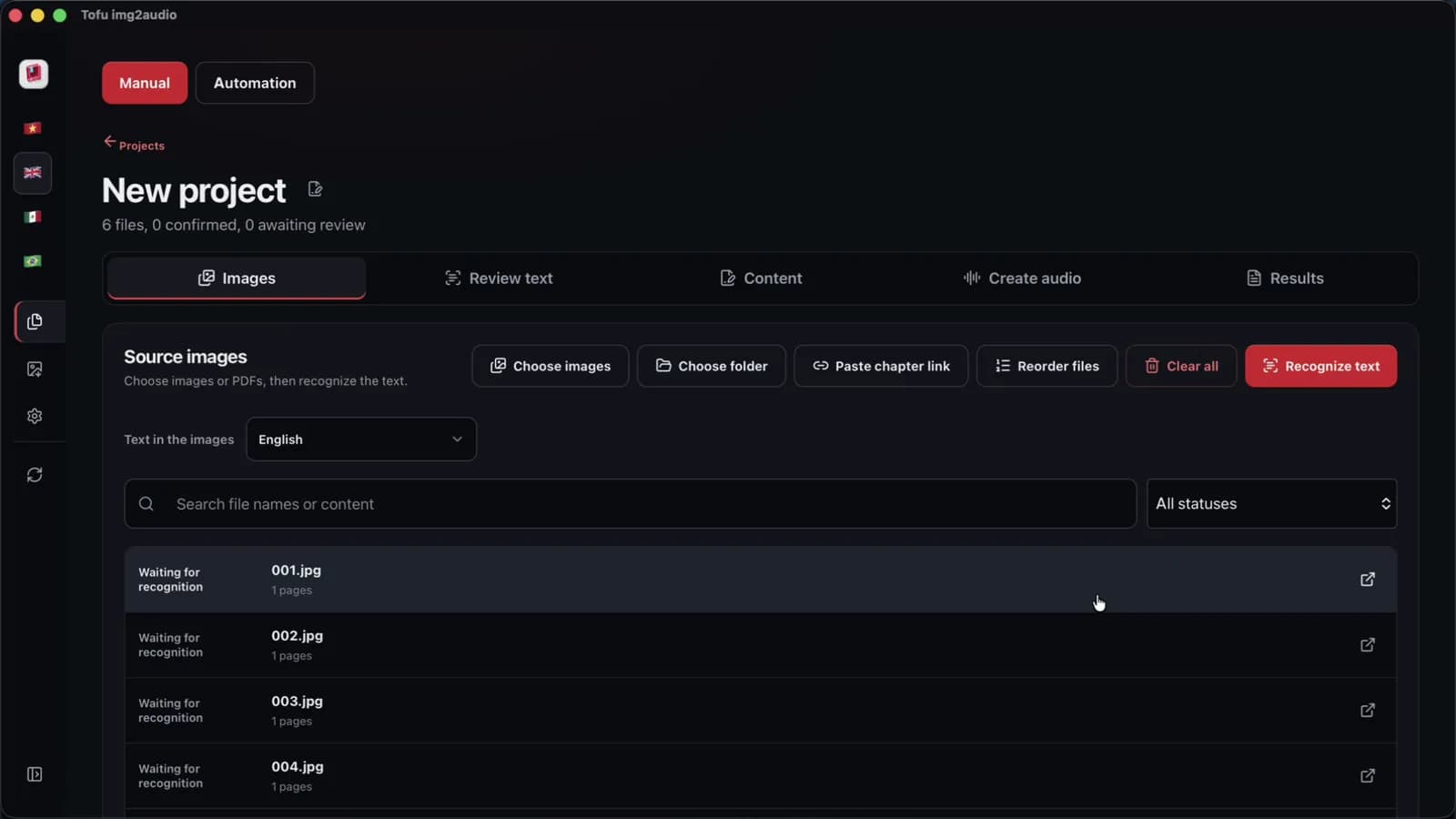
Tofu Image Text is a pay-once desktop app for Windows 10 or later and Apple silicon Macs (M1 or later), built for folders of pages rather than single screenshots. The app reads PNG, JPG, WEBP, HEIC, TIFF and scanned PDF files with OCR on the computer, so the images are not uploaded for the text. Each page sits beside its text for quick fixes, and the result exports as TXT or Word (.docx). Supported text covers English, Spanish, Portuguese and other Latin-alphabet languages, plus Vietnamese. The app can also turn the text into a script with your own AI key from Google or OpenAI, and into audio, a feature built for comic recap creators. On an Apple M4 Pro, we measured OCR on a short 6-page chapter at 2 seconds, in one recorded run with clean sample pages. Accuracy on real scans is not measured yet, and the app does not make searchable PDFs.
How do you test OCR software before paying?
A fair OCR test is the same small set of your own files, run through every tool you are considering. Pick 10 pages matching your real work: one clean page, one tilted page, one with a table, one with small print and a few typical pages. First, run all 10 pages through a free tool from Microsoft, Apple or Google to get a baseline. Second, run the same pages through each paid candidate. Finally, count three things per tool: wrong words on a sample paragraph, names and numbers that changed, and minutes spent fixing the output. For instance, a tool with slightly more errors but a page-beside-text review screen can still win on total time. The PowerToys documentation from Microsoft warns that output may not be perfect and needs a proofread, and the warning applies to every OCR tool. Keep the test files for the next tool.
FAQ
What is the best free OCR software for PC?
The best free OCR software depends on the job. For a quick copy from the screen on Windows, PowerToys Text Extractor from Microsoft works with `Win + Shift + T`. On a Mac, Live Text in Preview from Apple copies text from an image. For a file that may be uploaded, Google Drive converts PDFs and images when you open the file with Google Docs. For technical users, Tesseract is a free, open-source engine under the Apache-2.0 license with more than 100 languages. For instance, a single slide or receipt works well with any of the first three, and none of the three costs anything. Free tools get slow on folders, because each page needs a separate capture or upload. A batch desktop app makes sense once the same work repeats every single week.
Is offline OCR software more private than online OCR?
Offline OCR software is more private for the OCR step, because the image never leaves the computer. Google Drive converts files only after an upload to Google, which matters for contracts, medical letters and unpublished work. PowerToys Text Extractor from Microsoft and Live Text from Apple run as features of Windows and macOS. Tofu Image Text reads images and PDFs on the computer, so the images are not uploaded for OCR, though the app needs internet to check the license. For example, the optional AI step in Tofu Image Text sends text to the AI provider you choose, and Edge or CapCut voices send text to that voice service. In practice, first check where every step of a tool sends data, not only the OCR step, before using private or confidential files at work.
Can OCR software read handwriting and tables?
OCR software reads printed text best, and handwriting and tables are the weak spots for most tools. Handwriting varies from person to person, so errors rise quickly. Tables lose their structure: according to Google, Drive OCR is not likely to detect lists, tables, columns, footnotes and endnotes. For example, a two-column invoice can come out with both columns mixed. The practical routine is to get clean text first, then rebuild tables in Microsoft Word or a spreadsheet by hand. Tofu Image Text shows each page beside the text, which makes fixing easier, but the app does not rebuild tables either. If tables are the main job, test a tool with table export on your own files first.
Next step: pick 10 of your own pages, run them through one free tool and one batch tool, and count the fixes. If folders and privacy matter most, see Tofu Image Text, and read image to text converter for PC for the free options in more detail.