
Vietnamese text reader software for PC: how to choose
A text reader can mean listening to a page now or turning a whole book into MP3 files. Here is how to choose the right kind of Vietnamese reader for your files.

Vietnamese text reader software is a program reading Vietnamese text aloud with a synthetic voice, either live on screen or as audio files. Two very different jobs hide behind the same words. Some people want to listen to a page right now, such as an article, an email or a PDF. Others want to turn whole books, lessons or scripts into MP3 files to keep. In practice, a student listening to one chapter tonight needs a different tool from a creator producing 50 audio episodes. The guide first covers the free readers built into Windows, macOS and Microsoft Edge, then desktop apps that export files. Finally, the guide gives four questions for choosing, plus the Vietnamese-specific checks with the most weight: tone marks, names and numbers. The examples use Tofu Voice from TofuToon for file export, with Microsoft voices as the baseline.
Which free Vietnamese text readers are built into a PC?
The free readers built into a PC are good for listening now, not for saving audio. First, Read Aloud in Microsoft Edge reads web pages and PDFs with neural voices from Microsoft, and the Vietnamese voices HoaiMy and NamMinh appear in the edge-tts list of the same service. Second, Windows has Narrator, a screen reader from Microsoft built for accessibility, which reads whatever is on screen. Third, macOS has Spoken Content, built by Apple, which reads selected text aloud with system voices. For instance, a long article in Vietnamese can play in Read Aloud during a commute, with a speed control and a voice picker. The limit is the same for all three: the audio plays but does not save as an MP3 file, and each document needs opening by hand. These tools are the best place to audition voices before choosing a tool for files.
When do you need text reader software that exports MP3?
Text reader software with MP3 export is the right tool when the audio must outlive the moment: listening offline on a phone, building an audiobook, or putting a voice under a video. File export also matters for volume. A reader that plays one page at a time turns a 50-chapter novel into 50 manual sessions. Tofu Voice is a pay-once desktop app for Windows 10 or later and Apple silicon Macs (M1 or later). Base turns TXT files and folders into MP3 with 170+ natural voices, including Edge and CapCut voices, and retries failed files, according to TofuToon. First, put one chapter per TXT file. Second, preview a voice. Finally, convert the folder in one run. For example, a folder of 50 chapters becomes 50 MP3 files that any phone can play offline. Online voices, such as Edge voices from Microsoft, send the text to the voice service while generating.
How do you choose Vietnamese text reader software?
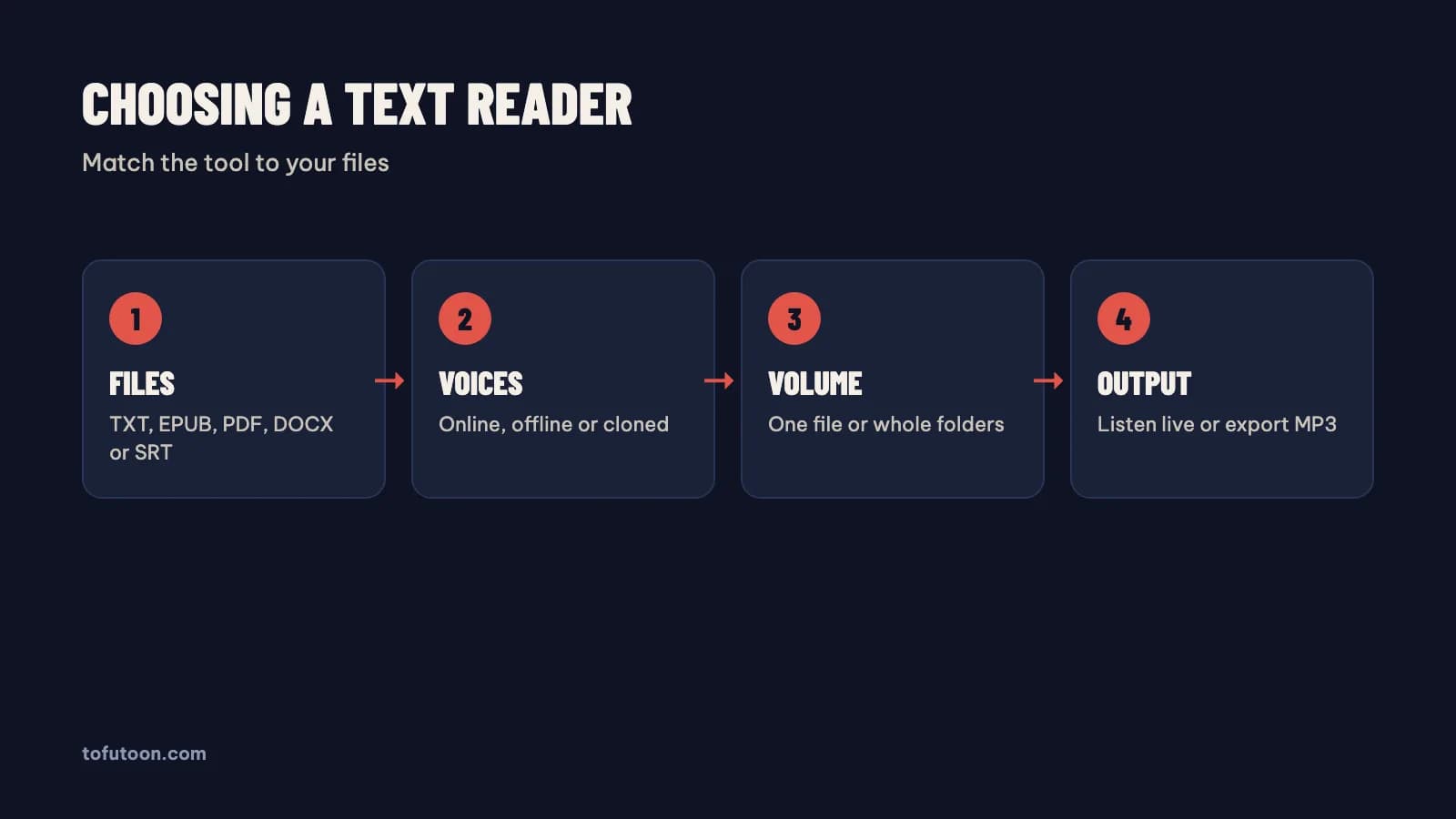
Choosing a text reader is a matter of four questions, answered for your own files. First, file types: TXT only, or also EPUB, PDF, DOCX and subtitles? Second, voices: online neural voices, offline voices for private text, or a clone of your own voice? Third, volume: one document now and then, or folders of chapters every week? Finally, output: live listening, or MP3 files to keep and share? For example, say a reader only follows web articles: Read Aloud from Microsoft is enough, while a creator converting EPUB books and subtitle files needs a desktop app with those formats. Base covers TXT; Pro adds EPUB, PDF with a text layer, DOCX, SRT and VTT subtitles, offline voices and a voice clone from your own recording, according to TofuToon. Write the four answers down before comparing tools, since the right tool follows from the files you actually have.
What Vietnamese-specific checks matter in a text reader?
Vietnamese-specific checks are the tests that catch problems an English review never shows: tone marks, names, numbers and encoding. Vietnamese has six tones, so a voice must handle hỏi and ngã marks correctly. First, test a paragraph with tone marks, a person’s name and a long number, such as "Hải hỏi: đơn hàng một triệu hai trăm nghìn đồng giao chưa?". Second, check the file encoding: text saved in old code pages can turn tone marks into garbage, so save files as UTF-8 in Notepad from Microsoft or any modern editor. Third, check abbreviations such as "TP.HCM", which a voice may spell out letter by letter. Finally, listen at the planned speed for five minutes. In practice, native voices such as HoaiMy and NamMinh from Microsoft, or the 24 Vietnamese CapCut voices in the catalog bundled with Tofu Image Text, handle tones far better than English voices.
FAQ
Is there free Vietnamese text reader software for PC?
Free Vietnamese text readers exist on every PC for live listening. Read Aloud in Microsoft Edge reads web pages and PDFs with neural voices from Microsoft, Narrator in Windows reads the screen, and Spoken Content in macOS reads selected text. A long Vietnamese article, for example, can play in Read Aloud with the HoaiMy voice at a chosen speed. The free tools do not save MP3 files, and each document needs opening by hand, so long projects get slow. First, use a free reader to choose a voice you like for long listening sessions. Then move to a desktop app with MP3 export once the project grows past a few documents. The Tofu Voice app from TofuToon is a pay-once app for that step, with Edge and CapCut voices and one MP3 per file.
Can a text reader work without internet?
Offline use is possible only with offline voices running on the computer. Online neural voices, such as Edge voices from Microsoft and CapCut voices, need internet while the audio is generated, and the text goes to the voice service. Offline voices keep the text on the computer and work with no connection, though offline voices can sound flatter. The Pro edition of Tofu Voice includes offline voices, according to TofuToon, and the app needs internet to check the license. Finished MP3 files play offline on any phone or computer either way, with no account. For example, a private contract read aloud for proofreading belongs with an offline voice, while a public novel can use an online voice. First, decide whether the text is private. Then pick the voice type that matches the text, online or offline.
Can text reader software read scanned PDFs in Vietnamese?
Text reader software reads only real text, so a scanned PDF needs OCR (optical character recognition) first. A scanned PDF is a stack of page images with no characters inside; the quick test is to try selecting a word. If nothing highlights, the file is a scan. [Tofu Image Text](/tools/img2audio), a pay-once desktop app from TofuToon, reads scanned PDFs and images with OCR on the computer, supports Vietnamese, and shows each page beside its text for quick fixes. In practice, a scanned Vietnamese textbook can become clean text and then audio in the same app. First, check the PDF for a text layer. Then pick the tool: OCR first for scans, direct reading for text PDFs.
Next step: answer the four questions for your own files, audition two Vietnamese voices in Read Aloud, and convert one chapter to MP3. For folders of text files, see Tofu Voice, and read Vietnamese text to speech for the voice test.