
Vietnamese text to speech on a PC: pick a voice, export MP3
Text to speech in Vietnamese is easy to try and hard to get right over a whole book. Here is how to test voices, prepare text and batch MP3 files on your computer.
Vietnamese text to speech means turning written Vietnamese into spoken audio with a synthetic voice. Vietnamese is a tonal language with six tones, so a voice that sounds fine in English can still stumble on hỏi and ngã marks, names and numbers. Two Vietnamese neural voices from Microsoft, HoaiMy and NamMinh, appear in the Azure Speech language list, and other services offer more. The hard part is not finding a voice; the hard part is a whole book or channel that sounds the same from start to end. For example, at 150 words per minute, a 3,000-word chapter gives about 20 minutes of audio. The guide first shows how to test a voice, then how to prepare text. Finally, the guide covers online and offline voices and batch export to MP3 files, using Tofu Voice as the example.
How do you test a Vietnamese text to speech voice?
A good voice test is one short paragraph with the things Vietnamese voices get wrong most: tones, proper names, numbers and a question. Short greetings hide flaws, because almost every voice reads "Xin chào các bạn" well. For instance, try this line: "Hải hỏi: Bạn đã sửa kỹ chương bảy chưa? Đơn hàng một triệu hai trăm năm mươi nghìn đồng sẽ giao lúc tám giờ rưỡi." First, listen for tone marks on hỏi, kỹ and rưỡi. Second, listen for the name Hải and the long number. Finally, check that the question rises at the end. Play the test on phone speakers as well as headphones. Compare two or three voices from Microsoft Edge or CapCut on the same paragraph, and keep the clearest one for the whole project. In practice, a voice failing the test on numbers can still work if the script spells numbers out in words.
How should Vietnamese text be prepared for text to speech?
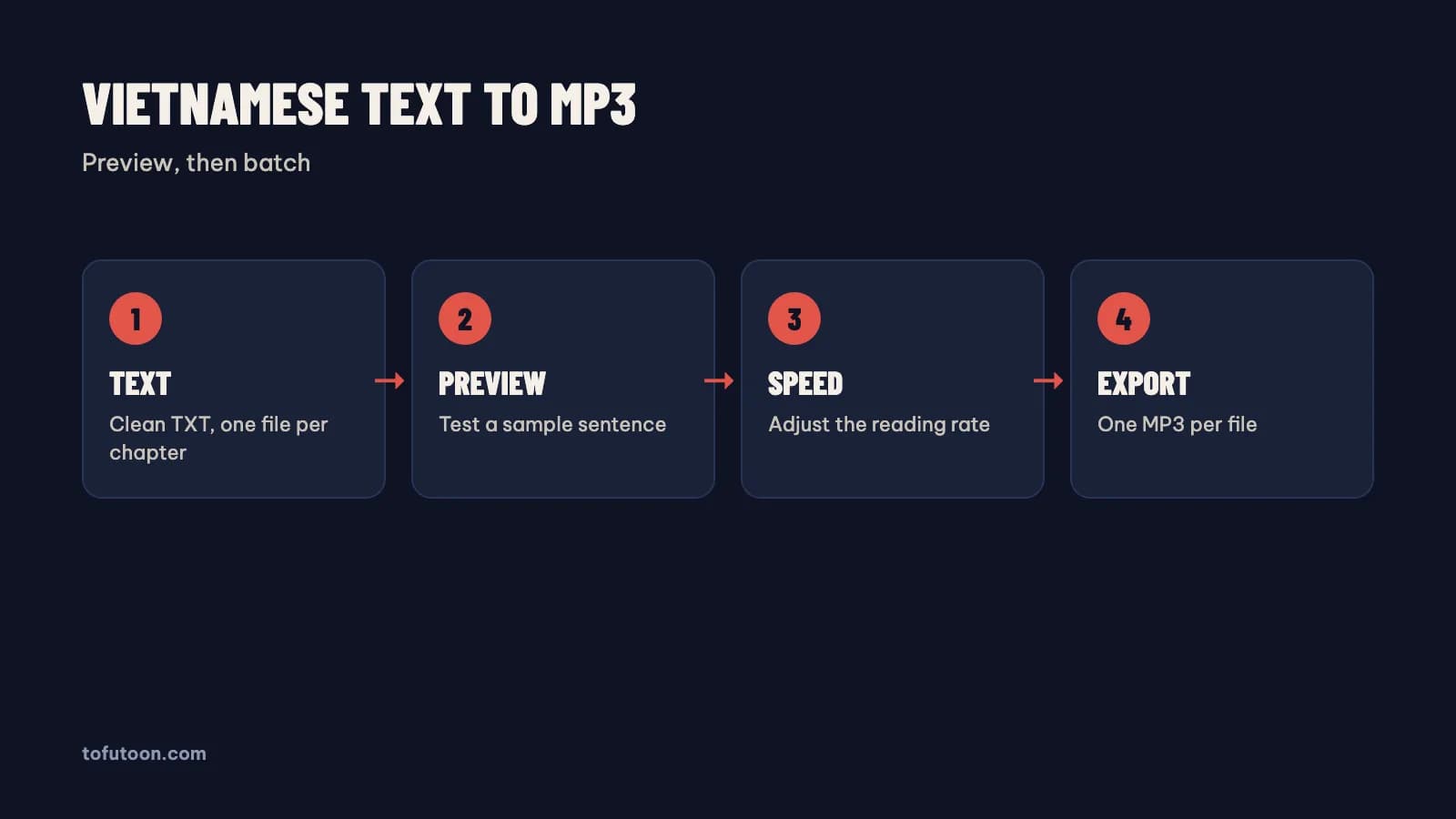
Prepared text is text written for the ear: clean characters, clear punctuation and nothing a listener should not hear. First, check the encoding. Text copied from old websites or PDFs can mix Unicode forms, and a voice may read a broken character as silence or noise; save files as UTF-8. Second, remove page numbers, headers, links and decorative symbols. Third, spell out abbreviations and numbers the way they should sound, such as "TP.HCM" as "Thành phố Hồ Chí Minh". Finally, split long sentences at a natural breath, since commas give short pauses and full stops give longer ones. A web novel chapter of 3,000 words, for example, can have dozens of ellipses and emoji; a find and replace in Microsoft Word or a text editor cleans them in one pass. One clean chapter per file, named 01, 02, 03, keeps the batch in order.
Should you use online or offline Vietnamese voices?
Online voices and offline voices are a trade between quality and independence, so first decide where the text may go. Online neural voices, such as Edge voices from Microsoft or CapCut voices, often sound more natural, but the text goes to that voice service and the computer needs internet while the audio is generated. Offline voices run on the computer, keep the text local and work without a connection, but offline voices can sound flatter over long chapters. In practice, a novel for personal listening works well with an online voice, while a private document fits an offline voice. The finished MP3 files play offline either way. Tofu Voice is a pay-once desktop app for Windows 10 or later and Apple silicon Macs (M1 or later). Base includes 170+ natural voices for TXT files, and Pro adds offline voices, voice cloning, and EPUB, PDF, DOCX and subtitle files.
How do you batch Vietnamese text into MP3 files?
Batch export is where a desktop app saves the most time, because each file becomes its own MP3 without copy and paste. First, put one chapter per TXT file in one folder, named in order. Second, open the folder using Tofu Voice, preview the chosen voice, such as an Edge voice from Microsoft, on a sample sentence and set the speed. Finally, start the batch: every file becomes an MP3 named after the source file, and failed files can be retried without redoing the finished ones. For example, say a folder holds 30 chapters: the folder becomes 30 MP3 files that any phone player can queue in order. The Tofu Voice landing page lists no character limits and no subscription. A web text box, by contrast, means pasting each chapter, waiting and downloading by hand. Listen to the start, middle and end of the first file before trusting the whole batch.
FAQ
How is a desktop app different from a free Vietnamese text to speech website?
A free text to speech website is a text box for short pieces, while a desktop app handles files and folders. A website may cap the characters per request, so a long chapter needs splitting, pasting and downloading piece by piece. A desktop app such as Tofu Voice opens TXT files, or EPUB, PDF and DOCX in Pro, and saves one MP3 per file. For instance, a 30-chapter novel is 30 paste-and-download rounds on a website and one batch in a desktop app. Websites suit a quick test of a voice, such as the listen button from Google Translate. Desktop apps suit books, channels and anything repeated every week. In practice, test the voice on a free website first, then move to a desktop app once the project needs more than a few files.
Can I play Vietnamese text to speech MP3 files on a phone?
MP3 is a standard audio format, so the files play on any phone, from Apple iPhones to Android phones from Samsung or Google. First copy the files with a cable, a cloud drive or a messaging app, then open the files with Apple Music or any other music or podcast player. Name the files with leading numbers, such as 01, 02 and 03, so the player keeps the chapters in the right order from start to finish. For example, a folder of 20 chapter MP3 files works as a simple audiobook in a music app. The files play without internet once copied, even if an online voice made the files, and no app account is needed to listen. Keep one folder per book on the phone, so a player does not mix chapters from two different books.
Does Tofu Voice Base include voice cloning?
Tofu Voice Base does not include voice cloning; voice cloning belongs to the higher edition (Pro). Base, according to TofuToon, turns TXT files and folders into MP3 with 170+ natural voices, batch conversion and retries for failed files. Pro adds EPUB, PDF and DOCX files, SRT and VTT subtitles to audio, offline voices and voice cloning from your own recording. For instance, a creator converting only TXT chapters can start with Base; ebooks or a personal voice need Pro. Clone only your own voice or a voice you have written permission to use. One license works on one computer at a time.
Next step: write one test paragraph with tones, a name and a number, and run the paragraph through two or three voices. Keep the clearest voice, clean one chapter, and export one MP3. For folders of chapters, see Tofu Voice, and read turn a novel into Vietnamese audio for the full book workflow.