
PDF to audiobook free: what you get and where it stops
For one PDF you may not need to pay anyone. Here is what the free routes give you, the caps to read first, and the narrow case where an app earns its price.
PDF to audiobook for free is possible today. The real question is what you need at the end: to hear this document now, or to keep a file you can play on a walk. Those are different tools. For listening alone, your computer probably has what you need already, and we'd tell you not to pay anyone. We sell a paid app for this, so here's our honest line on where free runs out.
If you only want to listen, stop here
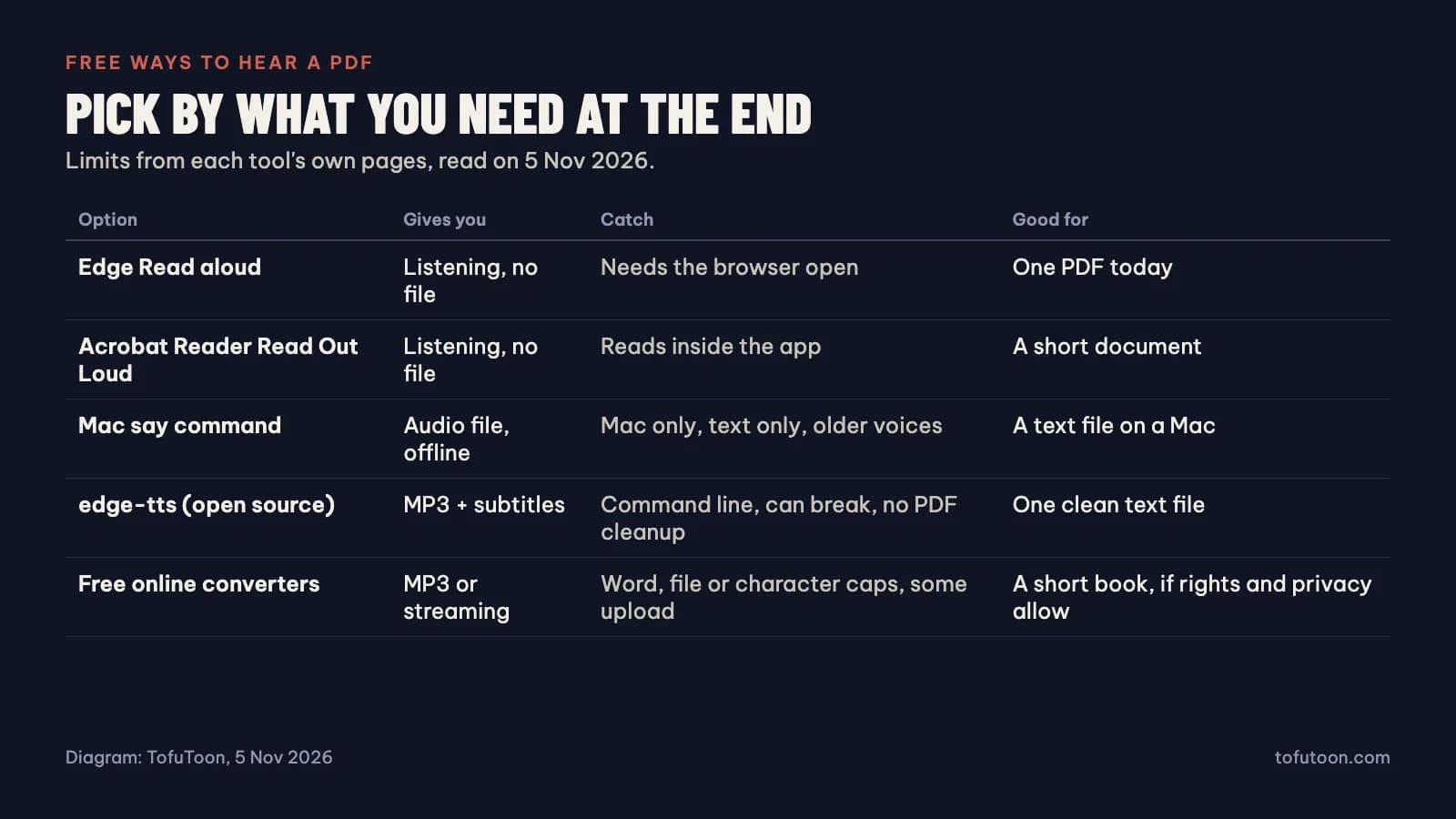
Microsoft Edge and Adobe Acrobat Reader will both read a PDF aloud for free. In Edge, open the PDF and use Read aloud, which has natural-sounding voices and works offline with a smaller set. In Adobe's free Acrobat Reader, go to View, then Read Out Loud, and choose the page or the rest of the document. One detail from Adobe's guide: reading starts from the page you're on, even when you pick the whole document, so go to page one first.
Neither gives you a file, so you'll stay at the computer, or at least near it. They also read whatever the PDF holds, including page numbers and headers. For a report you'll hear once, none of that matters. A twenty-page document at your desk needs nothing more, and everything below is extra.
If you want a file and can use a command line
Both of these take a text file and write audio, at no cost. They don't read PDFs directly, so you need to get the text out first. Copying it into a TXT file is enough for a short document.
On a Mac, the built-in say command works offline. On our test Mac, "say -v Samantha -f chapter.txt -o chapter.m4a --data-format=aac" turned an 859-word chapter into 4 minutes 13 seconds of audio in about 2 seconds, with nothing sent anywhere. The voice is older and quicker, at about 204 words a minute in that run, so try it before committing to a book.
On any system, the open-source edge-tts client gets you the neural Edge voices as MP3 with subtitles: "edge-tts --voice en-US-AriaNeural --file chapter.txt --write-media chapter.mp3 --write-subtitles chapter.srt". We used edge-tts 7.3.1 for our voice tests, and the files came out at 48 kbps, about 21.6 MB per hour. Now the catch: it's an unofficial client for a service that can change. On the day of our test, version 7.2.8 returned a 403 error and 7.3.1 worked. Expect to update it when it stops working one morning, and read Microsoft's terms if you'd use the audio for anything beyond yourself.
What free online PDF to audiobook converters limit
We read the pages of five free PDF-to-audio sites on 5 November 2026. Limits change, so check the page again before you upload a book, but these are the kinds of limit to look for:
- A word allowance. VoxShelf gives 5,000 words a month free, then asks you to name a price, which can be zero. Pride and Prejudice is about 127,000 words, or 26 months at the free rate if you never upgrade.
- A size cap. TTS.ai takes ebooks up to 50 MB and 500,000 characters, and asks you to split longer books. The same novel is about 717,000 characters, so it needs two runs.
- Listening only. CastReader says outright that its standard reader makes no audiobook file or MP3. AudioDoc plays chapters in the browser with 24 voices and no account, which is lovely for reading along, but check before assuming you can download.
- Paid voices. Audiobook Maker, open source and donation-funded, makes MP3 or M4B files for free and charges for its premium voices.
Some of these are really good, and for one book a month we'd try them before anything else. Two things to read first. Where does your file go? VoxShelf and CastReader say the PDF stays on your device, while Audiobook Maker says uploads are deleted at the end of the session. With a contract or an unpublished manuscript, that decides it. And do you have the rights? Audiobook Maker says plainly that it's for files you legitimately own, and that rule applies everywhere.
The cost free routes hide: PDF cleanup
Getting the text out of a PDF is where free routes cost you time. When we checked 275 sentences of a book-layout PDF, the raw text had only 77.5% of them intact, with a title and page number on all 18 pages and 67 words broken at line ends. The document code of Tofu Voice 0.1.6 raised that to 97.5%, and a plain PDF with no headers or hyphens already started at 99.6%. The full results are in our PDF to audiobook test.
So the cheapest fix is often free: find a plain version of the document. Failing that, ask whether a tool you're considering removes repeated lines. Try it on three pages and listen for a page number in mid-sentence. If you hear one, it will happen on every page for the whole book.
When a paid app makes sense, and when it does not
Our rule: do this twice a year and you shouldn't buy anything. Tofu Voice starts to make sense when you have many files, or the same job keeps coming back. Three things tip it. Folders: it takes a whole folder and saves one MP3 per file, named after the source, so a run of chapters stays in order. No caps: there are no character limits or monthly quotas, which matters at 127,000 words a book. Retries: failed files can be run again without redoing the rest.
It has real limits too. It costs money up front, it's a desktop app for Windows 10 or later and Apple-chip Macs, and you need the Pro edition or above to read PDFs. Its default voices need internet, like the free ones, and it won't read a scan, or split a book into chapters by itself. M4B with embedded chapters isn't on offer either. Audiobook Maker does, so go there when M4B is what you want.
Scans are the real wall
A scanned PDF won't work with any of the free routes above, because there's no text to read until OCR makes some. Our guide to scanned PDF to Word lists the routes, including free ones for a one-off job. For whole scanned books, Tofu Image Text handles the recognition on your computer and puts each page beside its text for correction, then makes the audio. We haven't measured its accuracy on real scans, so check names and numbers by eye.
FAQ
What is the best free PDF to audiobook converter?
It depends on the end result. To hear it now: Edge Read aloud. For a file with no upload on a Mac: the say command. For an MP3 with a neural voice: edge-tts, or VoxShelf, which runs in your browser, if the monthly allowance covers your file.
Is it legal to turn a PDF into an audiobook?
Making a private copy of something you have the right to use is one thing, and sharing or selling it is another. Copyright rules vary by country, so we can't give you a blanket answer. Public domain books and your own documents are the clear cases.
Why do free converters read page numbers aloud?
They read the PDF's text layer, and page numbers are in it. Some remove repeated lines and some don't. Three test pages will show you which kind you've got.
Try Edge Read aloud on your PDF right now. Want a file after that? Make one short chapter with a free route and time the whole job, including cleanup. Fine for your workload? Stop there. With a folder of documents waiting, look at Tofu Voice.