
Edge TTS without code: use Microsoft Edge voices in a desktop app
The Edge voices are natural Microsoft voices, but the usual route is a Python command line. Here are the options, from one-off reading to batch MP3 export.

Edge TTS is the online text-to-speech service behind the Read Aloud feature in the Microsoft Edge browser, and "edge-tts" is also the name of a popular open-source Python tool that uses the service from the command line. The voices are neural voices from Microsoft, with natural rhythm in many languages. The open-source tool lists 322 voices across 142 locales (counted on 2026-11-01). The catch for many people is code: the usual route means installing Python, typing commands and naming files by hand. For example, one command turns one text into one MP3, so a novel with 80 chapters means 80 commands or a script. The guide first explains what the edge-tts tool does, then the browser route. Finally, the guide covers a desktop app with a normal window, using Tofu Voice from TofuToon as the example, and the rules worth knowing before commercial use.
What does the edge-tts tool do?
Edge-tts is an open-source Python module and command-line program on GitHub that sends text to the Edge online voice service and saves the audio as an MP3 file. The edge-tts repository had more than 12,000 stars when checked on 2026-11-01. First, install Python and then the package. Second, list the voices with the --list-voices option, which prints names such as en-US-GuyNeural or vi-VN-HoaiMyNeural with a gender and a style tag. Third, run a command with --text or --file, a --voice name and --write-media for the output file. Finally, adjust the speed with the --rate option. For instance, one command can read a chapter file with HoaiMy and write chapter-01.mp3. The tool also writes subtitle files with timing. The service runs online, so the text goes to Microsoft and the computer needs internet.
Can you use Edge TTS voices in the browser without code?
The browser route is Read Aloud, a feature built into Microsoft Edge that reads web pages and PDFs aloud with the same family of neural voices. First, open a page or a PDF in Edge. Second, start Read Aloud from the toolbar or the right-click menu. Third, choose a voice and a speed in the Read Aloud settings. Read Aloud is good for listening, not for producing files: the browser plays the audio but does not save an MP3. In practice, a student can listen to a 20-page PDF on the commute, but a creator who needs audio files for a video gets nothing to download. Read Aloud is also a quick way to audition voices, such as Jenny, Guy or HoaiMy, before choosing one for a project. Test a voice in Read Aloud first, then move to a tool that exports files once the voice is chosen.
How do you get Edge TTS voices as MP3 without code?
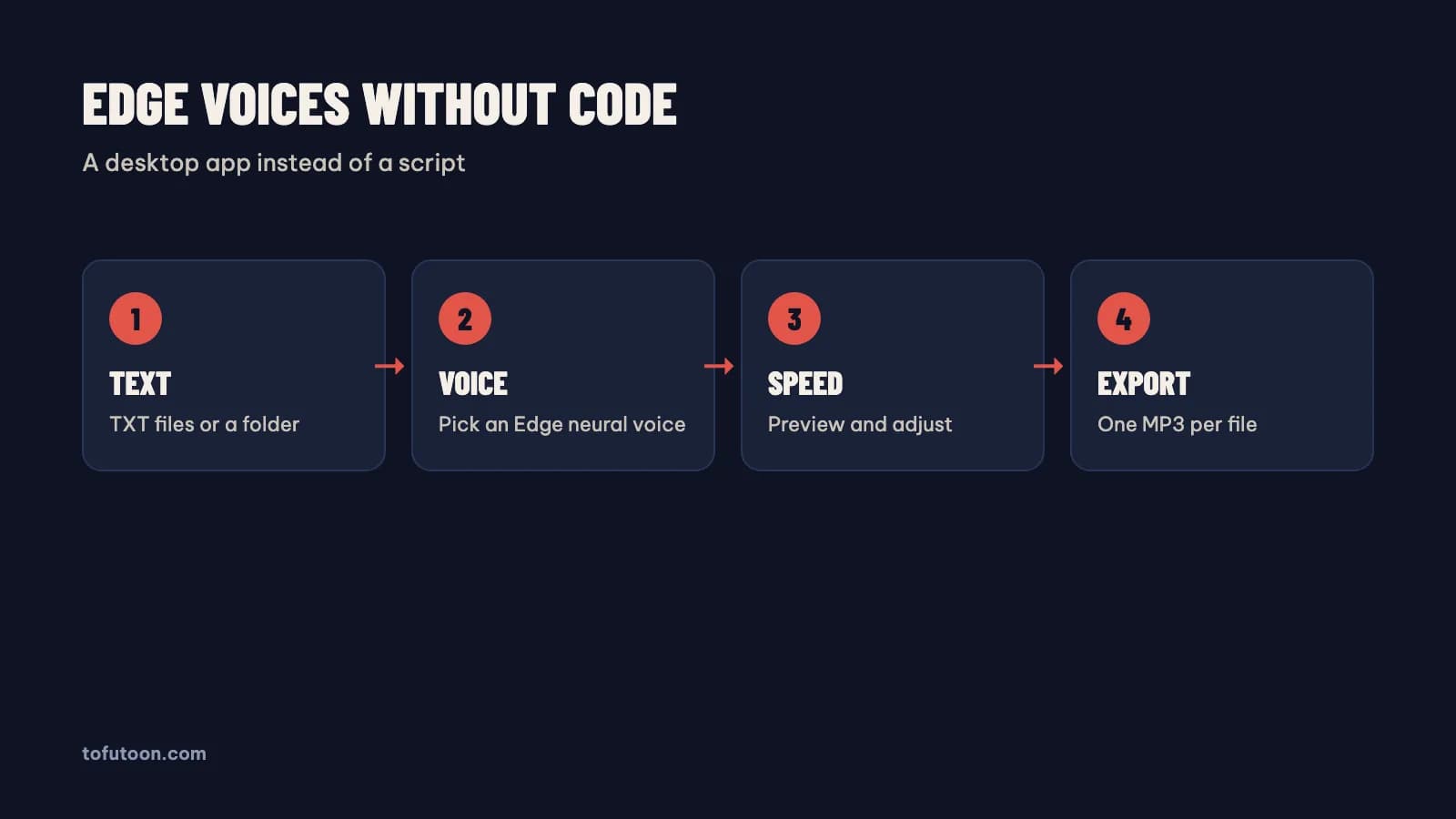
A desktop app gives Edge TTS voices a normal window: open files, pick a voice, export MP3, with no Python and no commands. Tofu Voice is a pay-once desktop app for Windows 10 or later and Apple silicon Macs (M1 or later) that offers Edge and CapCut voices in Base, with 170+ natural voices in total, according to TofuToon. First, put each chapter in its own TXT file, named 001, 002, 003. Second, open the folder using Tofu Voice and preview an Edge voice on a sample sentence. Third, set the speed. Finally, convert the whole folder in one run; each file becomes an MP3 named after the source, and failed files can be retried. For instance, a folder of 80 chapters becomes 80 MP3 files without 80 commands. The Pro edition adds EPUB, PDF with a text layer, DOCX, subtitles and offline voices.
What should you know before using Edge TTS commercially?
Commercial use of Edge TTS is a terms question, not a technical one. The command-line tool is open source, but the voices come from a Microsoft online service, and the service has its own terms. First, read the current terms from Microsoft for the service you use. Second, note that the official paid route for developers is Azure AI Speech, where Microsoft publishes the voice list and pricing for commercial apps. Third, keep a dated copy of the terms you relied on. Say a monetized audiobook channel is built on Edge voices: the channel should know which terms cover the audio before uploading 100 episodes. Under the YouTube GenAI disclosure rules from Google, a clearly synthetic narrator differs from a realistic voice of a real person, which needs disclosure. In practice, also check the rights to the text itself: only convert works you wrote, own or have permission to use.
FAQ
Is Edge TTS free?
The service is free to try through Read Aloud in the Microsoft Edge browser and through the open-source edge-tts tool, which uses the same online service. Free to try is not the same as licensed for every use: the voices come from Microsoft, and the terms from Microsoft decide what is allowed. For developers building commercial apps, Microsoft sells Azure AI Speech with published pricing. For example, a student listening to class notes in Read Aloud is a different case from a business selling audiobooks made with the same voices. Tofu Voice from TofuToon is a separate, pay-once desktop app that offers Edge voices for batch MP3 export. First, decide how the audio will be used. Then read the terms that apply. Keep a dated copy of the terms with the project files.
How many Edge TTS voices are there?
Microsoft offers 322 neural voices across 142 locales through the service, according to the edge-tts --list-voices output printed on 2026-11-01. The list grows and changes as Microsoft adds voices, so the count is a snapshot. Each entry shows a voice name, a gender, a category such as "News, Novel" and a personality tag such as "Warm" or "Rational". First, filter by locale: Vietnamese has two voices, HoaiMy and NamMinh. English (US) has many, including Guy, Jenny, Aria, Andrew, Brian and Christopher. For example, a narrator for an English audiobook can come from the "News, Novel" group, while a friendly explainer voice can come from "General". The full guide with the best narration picks is in [Edge TTS voice list](/blog/danh-sach-giong-edge-tts). Run the list yourself before a project, since names and counts change.
Can Edge TTS make subtitles as well as audio?
Subtitle output is a feature of the command-line tool: edge-tts can write a subtitle file with timing alongside the audio. Check the lines in an editor before publishing, since long sentences make long captions. Tofu Voice works the other way round in the Pro edition: Pro turns existing SRT and VTT subtitles into audio timed to the video, according to TofuToon. An editor dubbing a tutorial, for example, starts from the subtitle file and gets a voice track that follows the cues. First, decide whether the text or the subtitles come first in your workflow. Then pick the tool that starts from that file. The subtitle route is covered in [convert SRT to voice](/blog/chuyen-file-srt-thanh-giong-noi).
Next step: audition three Edge voices in Read Aloud, pick one, and convert ten chapter files without code. Listen on a phone before converting the rest. For folders of text with Edge or CapCut voices, see Tofu Voice, and read batch text to speech for folder preparation.